Severance Pay Calculator
Enter your pay, years of service and the weeks of pay per year to see the severance amount before tax.
Recent
Your last 10 settings, saved only in this browser. Nothing is uploaded.
How to use the Severance pay calculator
- Enter your gross “Pay” and choose whether it is per year, month, week or hour under “Pay is per”. For an hourly rate, also enter the “Hours per week”.
- Enter the “Years of service”. Use decimals for part years, for example 6.5 for six years and six months.
- Enter the “Weeks of pay per year of service” from your contract, policy or offer.
- Choose “How years are counted”: exact years, where part years count, or completed years only.
- Open “More options” if your terms add “Extra weeks”, set a “Minimum weeks of pay” or “Maximum weeks of pay”, or pay out “Unused leave days”. Set the “Workdays per week” for the leave payout.
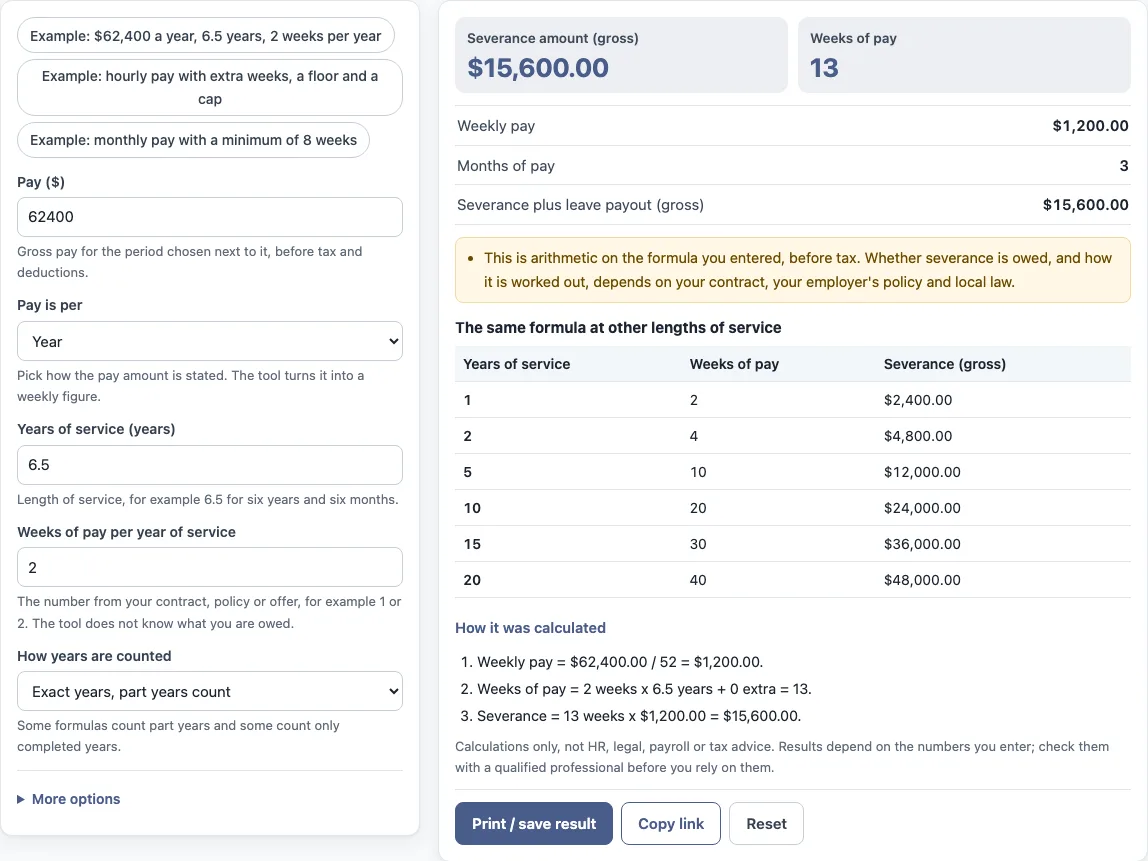
- Read the results: the severance amount, the weeks of pay, the weekly pay, the months of pay, and the leave payout and total if you entered leave days.
- The table repeats your formula for 1, 2, 5, 10, 15 and 20 years of service, and “How it was calculated” shows each step.
Three presets load examples, “Copy link” reopens your inputs, and “Reset” restores the first example. The first example is a yearly pay with two weeks per year, the second an hourly rate with extra weeks, a floor and a cap, and the third a monthly pay with a minimum of 8 weeks. The examples are only starting values, so replace them with your own numbers.
How do you calculate severance pay?
Work out the weekly pay, multiply the years of service by the weeks per year, and multiply the weeks by the weekly pay. In the default example the pay is $62,400 a year, so the weekly pay is $62,400 / 52 = $1,200. With 6.5 years of service at 2 weeks per year, the weeks of pay are 2 × 6.5 = 13. The severance is 13 × $1,200 = $15,600, which is 3 months of pay. The 2 weeks per year in the example is not a standard; use the figure in your own terms.
How is weekly pay worked out?
The tool converts the pay you enter to a weekly figure. A yearly pay is divided by 52, a monthly pay is multiplied by 12 and divided by 52, a weekly pay is used as it is, and an hourly rate is multiplied by the hours per week. If your agreement defines a week of pay in another way, enter the weekly figure directly with “Week”.
Do part years count?
It depends on the formula, so the tool has both options. With “Exact years, part years count” the 6.5 years in the example give 13 weeks at 2 weeks per year. With “Completed years only” the same service counts as 6 years and gives 12 weeks. A formula that counts only completed years gives 0 weeks to someone with 6 months of service.
How do a minimum, a cap and extra weeks work?
The tool first multiplies the weeks per year by the years and adds any extra weeks. It then raises the result to the minimum if it is lower, and cuts it to the maximum if it is higher. The second preset shows 12 completed years at 1 week per year plus 4 extra weeks, which is 16 weeks. That lies between its minimum of 4 and its maximum of 26, so neither limit applies. With 30 years at 2 weeks per year, a cap of 26 weeks reduces 60 weeks to 26.
What is the leave payout?
If your terms pay out unused leave, enter the days. Each day is paid at the weekly pay divided by the workdays per week. Six days at $1,064 a week and 5 workdays is 6 × $1,064 / 5 = $1,276.80.
Frequently asked questions
Is severance pay required?
The tool cannot say. Whether severance is owed and how much depends on your contract, your employer’s policy, any collective agreement and local law. Check those, or ask a qualified professional.
What is a common severance formula?
The tool does not give a standard figure. Formulas differ between employers and countries, and one or two weeks per year of service are only examples. Enter the number from your own documents.
Is the result before or after tax?
It is a gross amount, before tax and deductions. The tool does not calculate tax or take-home pay.
Can I use it for several scenarios?
Yes. Change the years, the weeks per year or the limits and read the new result. The table shows your formula at other lengths of service, and “Copy link” saves each scenario.
Can the tool work out severance under a specific law?
No. It applies the weeks per year and the limits that you type in. It does not contain any country’s rules, so take the figures from the law, contract or policy that applies to you.
Does the tool save my numbers?
No. It runs in your browser and nothing is uploaded. Use “Copy link” or “Print / save result” to keep a calculation.
Can I use the results in a document?
Yes, in commercial work without attribution. The tool only does arithmetic, so check the figures against your own documents.
Related tools
- Cost of turnover calculator: use it to add up what a departure costs an employer.
- Turnover rate calculator: use it to measure how many people leave.
- Employee cost calculator: use it to find the full yearly cost of an employee.
- FTE salary calculator: use it to convert pay to a full-time equivalent.
- Pay raise calculator: use it to see pay after a raise.
- Cost per hire calculator: use it to total recruiting costs.