Salary Range Penetration Calculator
Enter the pay and the range minimum and maximum to get the range penetration.
Recent
Your last 10 settings, saved only in this browser. Nothing is uploaded.
How to use the salary range penetration calculator
- Enter the pay in “Pay ($)”. Use the same pay period as the range. For example, enter annual pay if the range is annual.
- Enter the bottom of the pay range in “Range minimum ($)”.
- Enter the top of the pay range in “Range maximum ($)”.
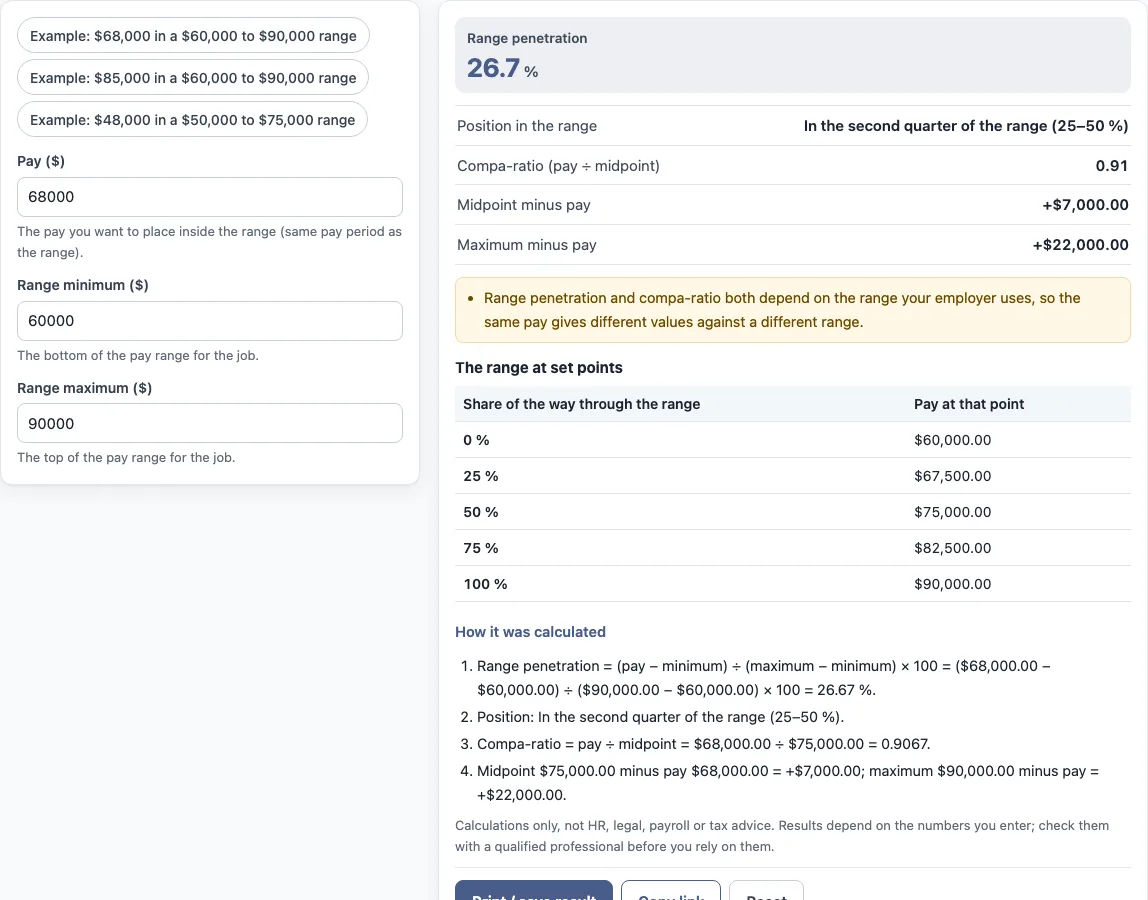
- Read “Range penetration” and “Position in the range” to see where the pay sits.
- Check “Compa-ratio (pay ÷ midpoint)”, “Midpoint minus pay” and “Maximum minus pay” for the comparison to the midpoint and maximum.
- Scroll to the table “The range at set points” to see the pay at 0, 25, 50, 75 and 100% of the range.
- Open “How it was calculated” to see each formula step with your own numbers.
The three preset buttons fill the form with sample values, for example “Example: $68,000 in a $60,000 to $90,000 range”. These values are examples, not real company data, so replace every one with your own numbers. “Reset” restores the example values. “Copy link” copies a link that reopens the same inputs. “Print / save result” prints a one-page sheet with the inputs, results, calculation steps and date. To keep a PDF, choose save as PDF in the print dialog.
Pay and the range must be for the same pay period, and the maximum must be above the minimum.
What is the difference between range penetration and compa ratio?
Range penetration measures where a pay figure sits between the range minimum and maximum, as a percentage. Compa-ratio measures the same pay against the midpoint of the range, as a ratio. Both use the same pay, but they compare it to different reference points.
Range penetration asks how far through the range the pay is. The formula is (pay − minimum) ÷ (maximum − minimum) × 100, so 0% is the minimum and 100% is the maximum. Compa-ratio is pay ÷ midpoint. The midpoint is halfway between the minimum and maximum.
For the worked example, pay of $68,000 in a range of $60,000 to $90,000 gives a range penetration of 26.7%. The compa-ratio is 0.91. The tool’s steps are ($68,000.00 − $60,000.00) ÷ ($90,000.00 − $60,000.00) × 100 = 26.67%, and $68,000.00 ÷ $75,000.00 = 0.9067.
Both values depend on the range your employer uses. The same pay in a different range gives different results. Neither value is a rating of a person.
What does 50 percent range penetration mean?
A range penetration of 50% means the pay sits exactly halfway between the range minimum and the range maximum. It is a position in the range, not a target or a judgement about the pay.
The formula sets pay minus minimum equal to half of (maximum minus minimum). The table “The range at set points” lists the pay at 50% of the range. For the $60,000 to $90,000 range in the example, that is the midpoint of $75,000.
The pay that gives 50% depends on the range. A different minimum or maximum moves the 50% point. In the tool, the position is shown as a quarter of the range, such as “In the second quarter of the range (25–50 %)”. A 50% result sits at the boundary between the second and third quarters.
What does the position text say?
The tool names the quarter of the range that the pay falls in: the first quarter (0–25 %), the second (25–50 %), the third (50–75 %) or the fourth (75–100 %). If the pay is below the minimum it says so, and the same for above the maximum, in which case the penetration is below 0 % or above 100 %. The text only describes where the number sits; it is not a recommendation about the pay.
Frequently asked questions
How is range penetration calculated?
Subtract the range minimum from the pay, divide by the range maximum minus the range minimum, then multiply by 100. The tool prints each step with your numbers under “How it was calculated”.
What do 0% and 100% range penetration mean?
0% is the range minimum and 100% is the range maximum. If the pay is below the minimum or above the maximum, the tool says so in the position result.
Does the tool save the numbers I enter?
The calculations run in your browser, and nothing you type is uploaded. “Copy link” creates a link that reopens the same inputs, and the page address keeps the inputs after any change.
Can I use the results in a report?
Yes. The results may be used in commercial work such as HR reports, policies, board packs and client documents, without attribution. The tool is arithmetic only and gives no HR, legal, payroll or tax advice.
Does range penetration rate an employee?
No. It shows where a pay figure sits in a range that the employer uses. It is not a rating of a person, and it does not say what the result means for anyone.
Can range penetration be over 100 percent?
Yes. If the pay is above the range maximum, the formula gives a value above 100 %, and the tool says the pay is above the maximum.
Related tools
- Compa ratio calculator: use it when you want only the pay-to-midpoint ratio.
- Salary range calculator: use it to work out range values from a set of inputs.
- Pay band calculator: use it when your pay structure is set out as bands.
- Pay scale calculator: use it when pay is set by steps on a scale.
- Merit increase calculator: use it to work out a merit increase.
- Pay raise calculator: use it to work out a raise from a current pay figure.
- Salary growth calculator: use it to see how a salary changes over time.