Salary Range Calculator
Enter two of minimum, midpoint, maximum and spread to build the whole salary range.
Recent
Your last 10 settings, saved only in this browser. Nothing is uploaded.
How to use the salary range calculator
- Under “What do you know?”, choose “Minimum and maximum”, “Midpoint and spread” or “Minimum and spread”. Pick the option that matches the two numbers you have.
- Enter your numbers in the fields that appear. “Range minimum ($)” and “Range maximum ($)” show for the first option. “Range midpoint ($)” and “Range spread (%)” show for “Midpoint and spread”. “Range minimum ($)” and “Range spread (%)” show for “Minimum and spread”.
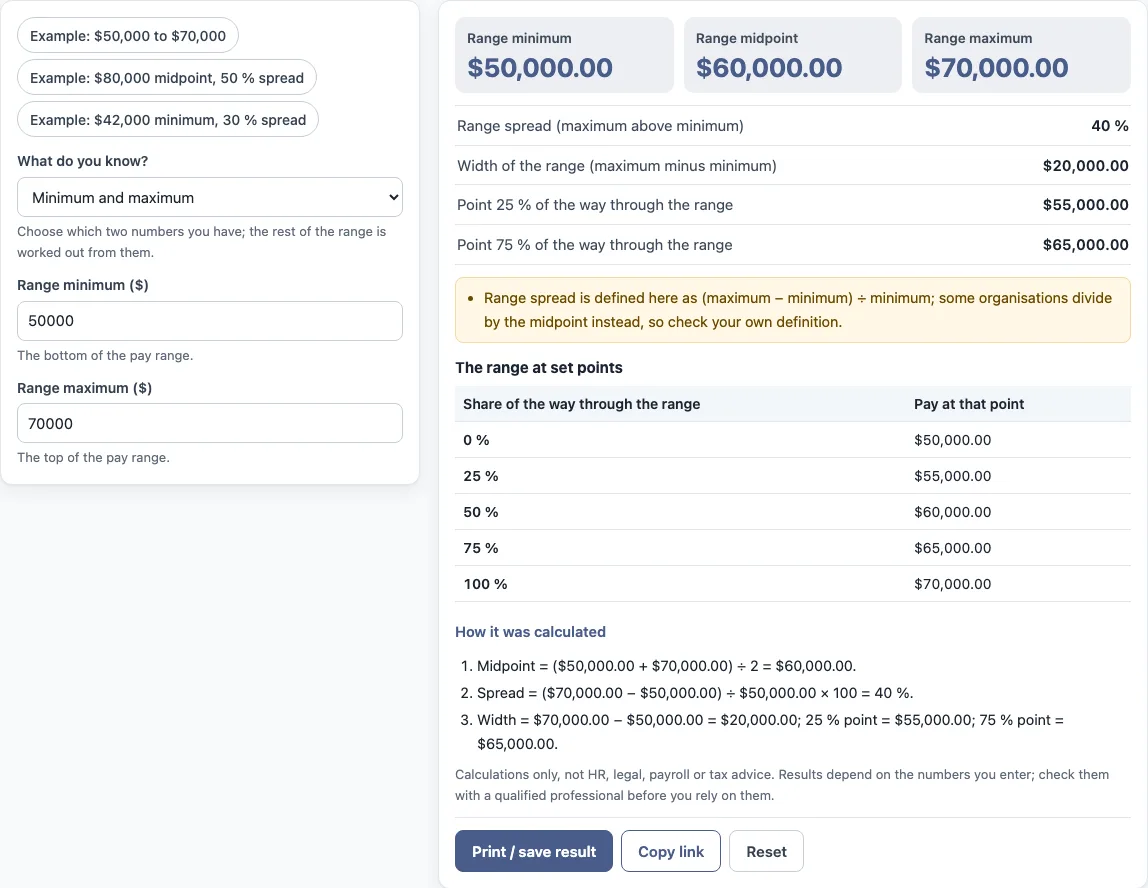
- Read the results: “Range minimum”, “Range midpoint”, “Range maximum”, “Range spread (maximum above minimum)”, “Width of the range (maximum minus minimum)”, “Point 25 % of the way through the range” and “Point 75 % of the way through the range”. The table “The range at set points” shows the range at set points along it.
- Open “How it was calculated” under the result to see each step of the formula with your numbers.
The three preset buttons fill the form with example values. The values in the form are examples, not real company data, so replace every one with your own numbers. “Reset” restores the example values. “Copy link” copies a link that reopens the same inputs, and the page address keeps the inputs after any change. “Print / save result” prints a one-page sheet with the inputs, results, calculation steps and the date. To keep a copy as a file, choose save as PDF from the print dialog.
What is the range spread?
Range spread is how far the maximum is above the minimum, as a percentage of the minimum. In this tool it is calculated as (maximum − minimum) ÷ minimum × 100.
With a minimum of $50,000 and a maximum of $70,000, the calculation is ($70,000 − $50,000) ÷ $50,000 × 100 = 40 %. Some organisations divide by the midpoint instead of the minimum, so check which definition your own organisation uses before comparing results.
How do I find the midpoint of a salary range?
Add the minimum and the maximum, then divide the total by two. The formula is Midpoint = (min + max) ÷ 2.
With a minimum of $50,000 and a maximum of $70,000, the calculation is ($50,000 + $70,000) ÷ 2 = $60,000.
How does the calculator find a missing number?
The tool uses the same formulas in reverse when you enter a midpoint and spread instead of a minimum and maximum. The minimum is found with min = midpoint ÷ (1 + spread/200). The maximum is then found with max = min × (1 + spread/100).
When you enter a minimum and spread, the tool skips the first step and works out the maximum directly with max = min × (1 + spread/100). When you enter a minimum and maximum, the midpoint, spread and width are calculated from those two values.
The width is the maximum minus the minimum. The two quartile points sit 25 % and 75 % of the way from the minimum to the maximum. In the worked example, a width of $20,000 gives a 25 % point of $55,000 and a 75 % point of $65,000.
Ranges are set by employers. This tool only applies the formulas. Pay grade and salary band structures differ between organisations, and the tool does not say what a result means for any person. It is arithmetic only and gives no HR, legal, payroll or tax advice.
What are the quartile points for?
The quartile points mark where 25 % and 75 % of the way from the minimum to the maximum fall. They split the range into four equal parts by pay, which some organisations use when they describe where pay sits in a range. The tool only calculates the points; it does not say which part of a range pay should be in. The table at 0, 25, 50, 75 and 100 % lists the pay at each of those positions.
Sources: Wikipedia: Pay grade.
Frequently asked questions
Is the salary range calculator free to use?
Yes. It is free, runs in your browser, and needs no account or sign-up. Nothing you type is uploaded.
Where do the salary range numbers come from?
Ranges are set by employers. The calculator only applies the formulas to the numbers you enter. It does not look up pay scales, inflation or survey data.
Can I use the results in an HR report or board pack?
Results may be used in commercial work, such as HR reports, policies, board packs and client documents, without attribution. The tool gives arithmetic only, so it does not say what a result means for any individual.
Does the calculator work out tax or take-home pay?
No. It calculates the range only. It does not calculate tax, take-home pay, sick pay or any legal entitlement.
Why might my range spread differ from another source?
The tool defines range spread as (maximum − minimum) ÷ minimum. Some organisations divide by the midpoint instead, so the same range can give a different spread depending on the definition used.
What does the range width show?
The width is the maximum minus the minimum, in dollars. In the worked example the range runs from $50,000 to $70,000, so the width is $20,000.
Related tools
- Compa ratio calculator: use it to compare a salary with the midpoint of its range.
- Salary range penetration calculator: use it to see where a salary sits between the minimum and maximum of its range.
- Pay band calculator: use it to work with the ranges within a pay band.
- Pay scale calculator: use it to work through the steps of a pay scale.
- Merit increase calculator: use it to work out a merit increase as a percentage of a current salary.
- Pay raise calculator: use it to work out the new figure after a pay raise.
- Salary growth calculator: use it to see how a salary changes over several years at a set rate.