Salary Increase Percentage Calculator
Enter the old and new pay to get the percentage increase, or solve for either pay figure.
Recent
Your last 10 settings, saved only in this browser. Nothing is uploaded.
This percentage increase salary calculator finds the percentage change between an old pay figure and a new one, or works out the new pay or old pay from a given percentage. It runs in your browser, is free, and needs no account or sign-up. Use it to check a raise, a pay cut, or a figure expressed as a share of pay. You can also use it to calculate wage increase between two pay figures.
The tool is arithmetic only. Both pay figures must cover the same pay period, and amounts are gross pay. It does not calculate take-home pay, tax or any entitlement, and it does not provide average raise figures.
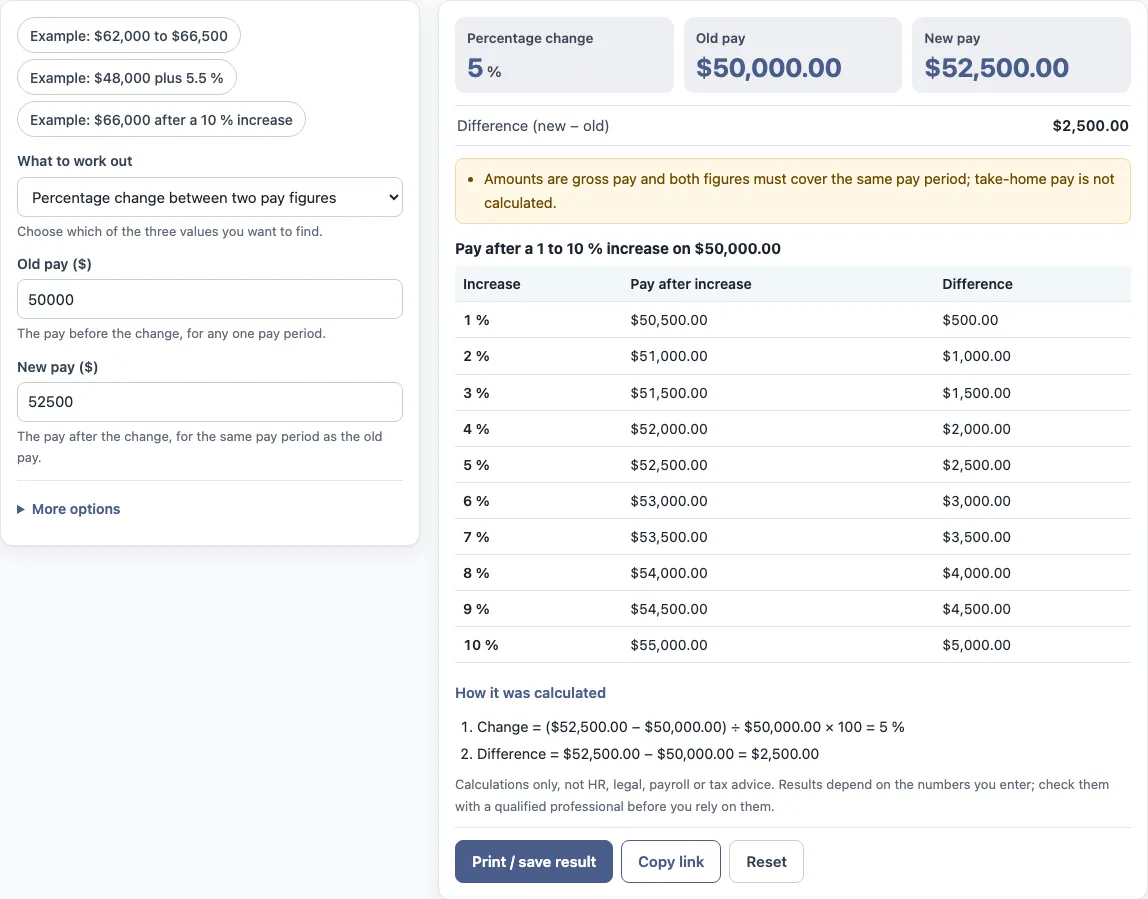
How to use the salary increase percentage calculator
- Under “What do you want to find?”, choose one option: “Percentage change between two pay figures”, “New pay from old pay and a percentage”, or “Old pay from new pay and a percentage”.
- Enter “Old pay ($)” and “New pay ($)” when they are shown for your choice. To find the percentage change, fill in both.
- If you chose a new pay or old pay option, enter a value in “Increase (negative = decrease) (%)”. Use a negative number for a decrease.
- Read the results: “Percentage change”, “Old pay”, “New pay” and “Difference (new − old)”.
- Under “More options”, enter a number in “Percent of the salary (optional) (%)” to see “Share of the old pay” and “Share of the new pay”. Leave it blank to skip it.
- Check “How it was calculated” under the result to see each step with your numbers.
The preset buttons fill the form with example values. The values already in the form are examples, not real company data, so replace every one with your own figures. “Reset” restores the example values. “Copy link” copies a link that reopens the same inputs, and the page address keeps your inputs after any change. “Print / save result” prints a one-page sheet with the inputs, results, calculation steps and date. To keep a PDF, choose save as PDF in the print dialog.
How to calculate salary increase percentage: how do you calculate salary increase, how do I calculate my raise percentage, your pay increase percentage, wage increase percentage, pay raise percentage or annual salary increase percentage, and how to calculate a raise in salary or an increase salary with percentage?
To calculate a salary increase percentage, subtract the old pay from the new pay, divide the result by the old pay, and multiply by 100. The formula is: Percentage increase = (new pay − old pay) ÷ old pay × 100. A negative result is a decrease.
The tool’s worked example uses an old pay of $50,000.00 and a new pay of $52,500.00. The step is ($52,500.00 − $50,000.00) ÷ $50,000.00 × 100 = 5 %, and the “Difference (new − old)” is $2,500.00. The division is by the old pay, so the percentage is measured against the starting figure.
How to figure out, work out or find a raise percentage, salary increase percentage, pay increase or percentage increase in salary?
All of these use the same step: subtract the old pay from the new pay, divide by the old pay and multiply by 100. To calculate wage increase or a pay increase, use the figures for the same pay period, such as annual pay for both. The tool prints each of these steps with your numbers.
How much is a 3 percent raise? How do you calculate a 2 raise or a 3 raise?
A 3 percent raise adds 3 % of the old pay to it, so the new pay is the old pay multiplied by 1.03. A 2 percent raise uses 1.02. The “3 raise” and “2 raise” in a search mean 3 percent and 2 percent.
How do you calculate a raise from a percentage?
To find the new pay from a percentage, multiply the old pay by (1 + percent ÷ 100). A 3 percent raise therefore means multiplying the old pay by 1.03, which adds 3% of the old pay to it. To find the old pay from a new pay and a percentage, divide the new pay by (1 + percent ÷ 100).
Pay, raises and pay periods can be defined differently by organisations, policies, contracts or countries. Check which definition applies before you use a result in a formal document.
Frequently asked questions
How do I calculate the percentage of a raise?
Subtract the old pay from the new pay, divide by the old pay, and multiply by 100. Choose “Percentage change between two pay figures” to have the tool do this for you.
How much is a 3 percent raise?
A 3 percent raise adds 3% of the old pay, so the new pay is the old pay multiplied by 1.03. Choose “New pay from old pay and a percentage” and enter 3 in “Increase (negative = decrease) (%)”.
Can this tool calculate a pay cut?
Yes. Enter a negative number in “Increase (negative = decrease) (%)” when finding new pay or old pay. When finding the percentage change, a lower new pay gives a negative result.
Does the tool calculate take-home pay or tax?
No. Amounts are gross pay, and the tool does not calculate tax, take-home pay, sick pay or any legal entitlement.
Does the tool compare my raise with salary survey or market data?
No. The tool only uses the figures you enter. It does not look up pay scales, inflation or market data, and it does not say what a result means for any person.
Is what I type uploaded anywhere?
Nothing you type is uploaded. The tool runs in your browser.
Related tools
- Pay raise calculator: for working out a pay raise in a separate calculation.
- Merit increase calculator: for working out a merit increase.
- Cost of living raise calculator: for working out a cost of living raise.
- Salary growth calculator: for looking at salary growth over time.
- Compa ratio calculator: for comparing a salary with a reference pay point.
- FTE salary calculator: for working out a salary based on full-time equivalent.
- Pay scale calculator: for working with pay scale figures.