Salary Growth Calculator
Enter the starting salary, the yearly raise and the years to project your pay.
Recent
Your last 10 settings, saved only in this browser. Nothing is uploaded.
The salary growth calculator projects a salary year by year from a starting salary, a yearly raise percentage and an optional promotion increase. It shows the final salary, the total pay over all years, the average yearly growth and the total increase, along with a table for each year. This salary forecast calculator runs in your browser. It is free, and there is no account or sign-up.
Every raise is a figure you type in, so the projection shows what your numbers would produce. It does not predict what any employer will pay. You can use the same tool as a salary calculator with raises by adding a promotion schedule under “More options”. The values already in the form are an example, so replace them with your own numbers before you rely on the result.
How to use the salary growth calculator
- Enter your figure in “Starting salary (year 1) ($)”. This is your gross pay per year in the first year.
- Enter the percentage in “Raise each year (%)”. The tool adds this to the previous year’s salary at the start of each later year.
- Enter the number of years in “Number of years”. The starting year counts as year 1.
- If you want promotion increases, open “More options”. Enter a whole number in “Promotion every (years, optional)” and the extra percentage in “Extra increase at each promotion (%)”. Leave the first field blank for no promotions.
- Read the results: “Salary in the last year”, “Total pay over all years”, “Average yearly growth (compound)” and “Increase from year 1 to the last year”.
- Check the “Salary by year” table to see each year’s salary.
- Open “How it was calculated” under the result to see each step with your numbers.
You can start from one of the three preset buttons, which fill the form with example values. “Reset” restores the example values. “Copy link” copies a link that reopens the same inputs. “Print / save result” prints a one-page sheet with your inputs, results, calculation steps and the date. To keep a copy as a file, choose save as PDF in the print dialog.
How is salary growth calculated?
The tool starts with the “Starting salary (year 1) ($)” in year 1. Each later year equals the previous year’s salary multiplied by (1 + raise ÷ 100). In a promotion year, the extra percentage from “Extra increase at each promotion (%)” is applied on top of the yearly raise.
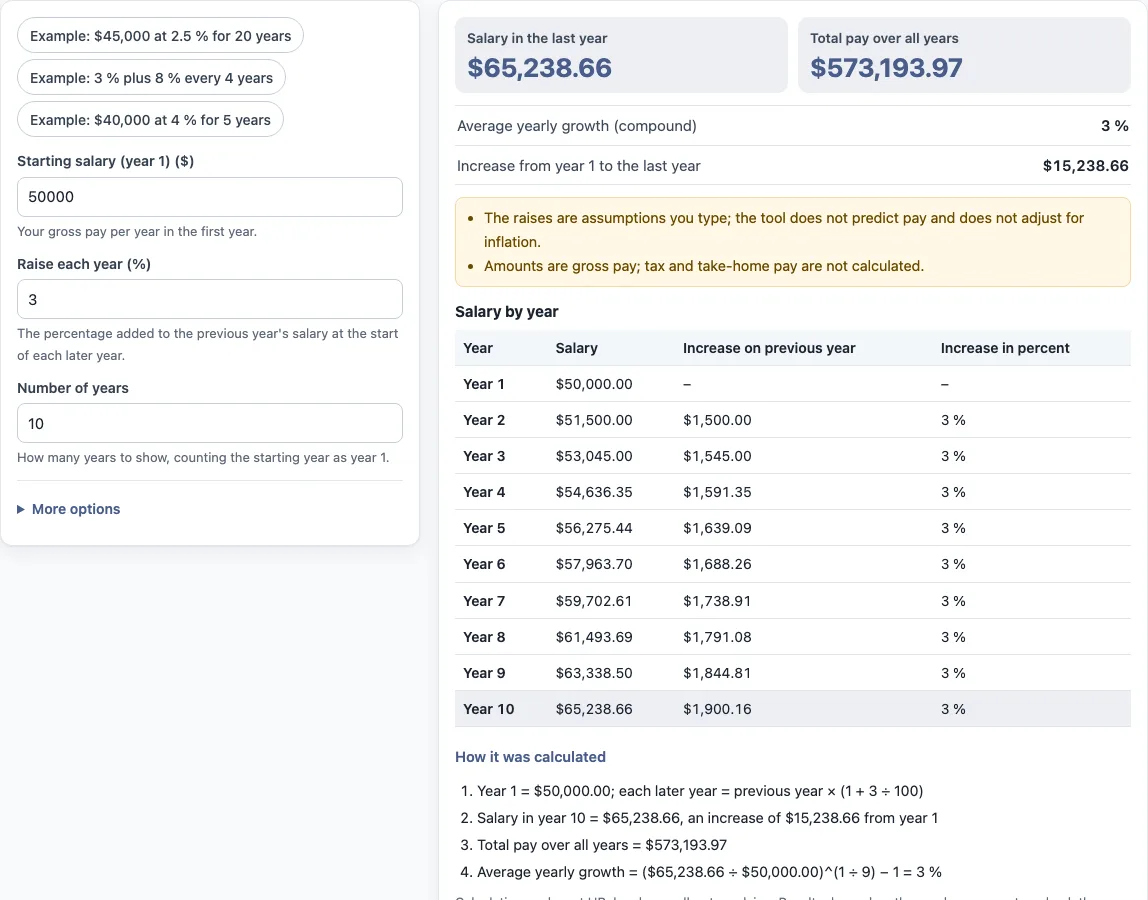
Using the default values, the tool shows year 1 as $50,000.00 and each later year as the previous year × (1 + 3 ÷ 100). Year 10 is $65,238.66, which is an increase of $15,238.66 from year 1. “Total pay over all years” is the sum of every yearly salary, which is $573,193.97 in this example.
“Average yearly growth (compound)” is the single rate that would move the first salary to the last one over the same number of steps. The tool calculates it as ($65,238.66 ÷ $50,000.00)^(1 ÷ 9) − 1, which gives 3 %. The exponent uses 9 because there are nine raises between year 1 and year 10.
Does the projection include inflation or tax?
No. The projection does not adjust for inflation, and the tool does not look up inflation figures. Amounts are gross pay. Tax and take-home pay are not calculated. The tool shows these notes under the result: the raises are assumptions you type, and the tool does not predict pay.
If you want to compare future pay with prices, you need to do that adjustment yourself. The tool does not give legal, payroll, tax or HR advice, and it does not say what a result means for any person.
How do promotion increases work in the projection?
If you enter “Promotion every (years, optional)” and “Extra increase at each promotion (%)”, the extra percentage is applied on top of the yearly raise in the promotion years. A promotion every 4 years means the first extra increase lands in year 5, then in year 9, and so on, because the tool counts the years since year 1. The preset “Example: 3 % plus 8 % every 4 years” shows this. If the promotion interval is filled in but the percentage is blank, the extra increase counts as 0 %.
What are the year-by-year table and the total pay?
The table lists each year’s salary and the percentage increase from the year before. “Total pay over all years” adds every yearly salary together; it is the sum of the salaries, not a promise of earnings, and it is before tax.
Frequently asked questions
Does the calculator predict my future pay?
No. Every raise and promotion percentage is an assumption that you enter. The tool shows what those assumptions produce and does not forecast any employer’s decisions.
Does the tool save the numbers I enter?
The tool runs in the browser, and nothing you type is uploaded. “Copy link” keeps your inputs in a link, and the page address keeps the inputs after any change.
What happens if I leave “Promotion every (years, optional)” blank?
The tool applies no promotion increases. Only the yearly raise from “Raise each year (%)” changes the salary from one year to the next.
Can I use the results in an HR report or client document?
Yes. Results may be used in commercial work, such as HR reports, policies, board packs and client documents, without attribution. Check your own organisation’s rules for how it defines pay figures, because some organisations and contracts define them differently.
Are the values in the form real company data?
No. The values already in the form are an example, not real company data. Replace every one with your own numbers.
Can I project more than 40 years?
No. The tool accepts a whole number of years from 1 to 40.
Related tools
- Pay raise calculator: use it to see the effect of a single pay increase on a salary.
- Salary increase percentage calculator: use it when you know the old and new salary and need the percentage change.
- Merit increase calculator: use it when you are working with a merit-based increase.
- Cost of living raise calculator: use it when you are working with a cost-of-living adjustment.
- Compa ratio calculator: use it to compare a salary with a reference midpoint.
- FTE salary calculator: use it to work out pay for a part-time or full-time equivalent.
- Pay scale calculator: use it when you are working with a published pay scale.