Pay Scale Calculator
Enter the grades, steps and increases to build a pay scale table.
Recent
Your last 10 settings, saved only in this browser. Nothing is uploaded.
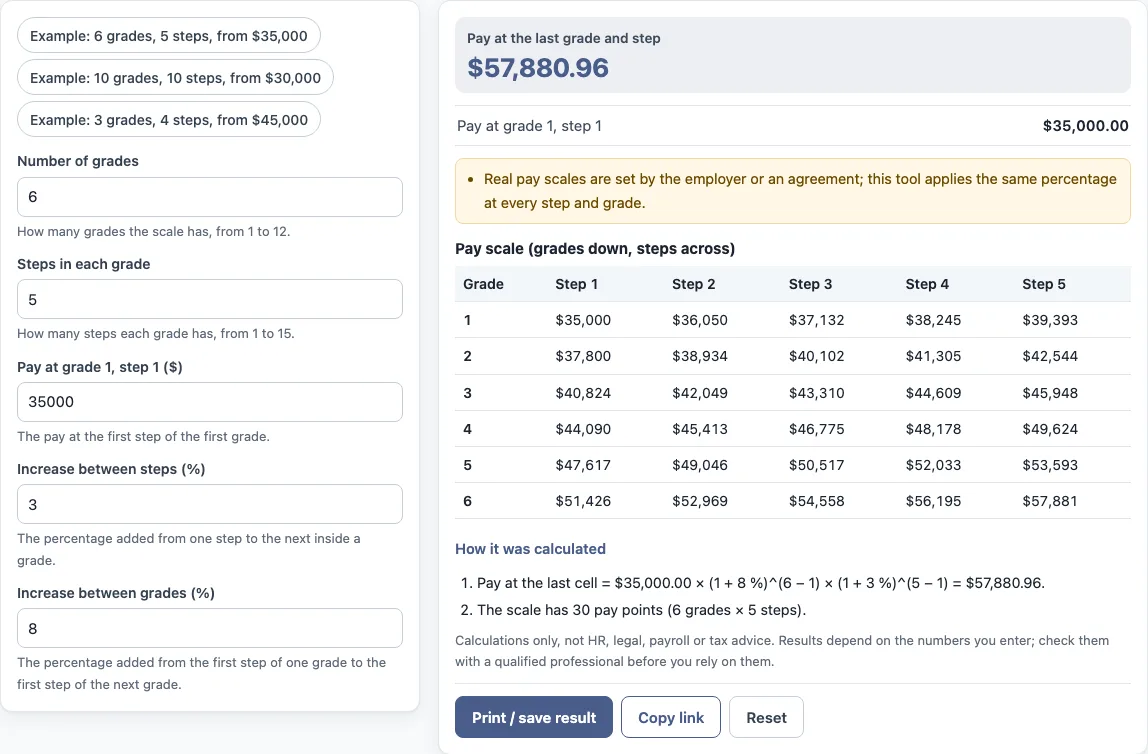
How to use the pay scale calculator
- Enter the “Number of grades”, from 1 to 12.
- Enter the “Steps in each grade”, from 1 to 15.
- Enter “Pay at grade 1, step 1 ($)”, which is the lowest pay on the scale.
- Enter the “Increase between steps (%)”, the percentage added from one step to the next inside a grade.
- Enter the “Increase between grades (%)”, the percentage added from the first step of one grade to the first step of the next.
- Read “Pay at the last grade and step” and “Pay at grade 1, step 1” in the results.
- Check the table. Grades run down the side and steps run across the top.
- Open “How it was calculated” under the result to see each step of the formula with your numbers.
The three preset buttons, “Example: 6 grades, 5 steps, from $35,000”, “Example: 10 grades, 10 steps, from $30,000” and “Example: 3 grades, 4 steps, from $45,000”, fill the form with sample values. “Reset” restores the example values. “Copy link” copies a link that reopens the same inputs, and the page address keeps your inputs after each change. “Print / save result” prints a one-page sheet with the inputs, results, calculation steps and date. To keep a PDF, choose save as PDF in the print dialog.
The preset buttons load examples with different numbers of grades and steps.
How do grades and steps work in a pay scale?
A pay scale is a table of pay by grade and step. Grades are the levels on the scale, and steps are the increments within each grade. In this tool, grades run down the table and steps run across it, so each cell is one pay point. The default example has 6 grades and 5 steps, which gives 30 pay points (6 × 5).
Within a grade, pay rises from one step to the next by the “Increase between steps (%)”. The first step of each grade is set from the first step of the previous grade by the “Increase between grades (%)”. The tool does not define what a grade or step means for any job. That is decided by the organisation or agreement that uses the scale.
How do you calculate a pay scale online?
The tool uses this formula: pay at grade g and step s = lowest pay × (1 + grade increase %)^(g − 1) × (1 + step increase %)^(s − 1). Each exponent counts how many increases have been applied. Grade 1, step 1 has no increases, so it equals the lowest pay.
With the default values, the last cell is $35,000.00 × (1 + 8%)^(6 − 1) × (1 + 3%)^(5 − 1) = $57,880.96. Here $35,000 is the lowest pay, 8% is the increase between grades, and 3% is the increase between steps. The tool prints each of these steps under “How it was calculated”, using your own numbers.
The tool applies the same percentage at every step and grade. Real pay scales are set by an employer or an agreement, and they may not follow one constant percentage.
What does the highest pay show?
“Pay at the last grade and step” is the pay in the last grade and last step, the bottom-right cell of the table. It tells you how far the scale rises with the percentages you entered: more grades, more steps or larger increases all raise it. The lowest pay is shown as well, so the two numbers give the width of the scale. Because every increase is a constant percentage, the pay points grow faster at the top than at the bottom, the way compound growth does.
Sources: Wikipedia: Pay scale.
Frequently asked questions
Does the tool look up a published pay scale?
No. It applies the constant percentages you enter and does not look up any published scale. This includes NHS band, government band and hay band scales. Where an organisation defines a band or grade differently, its own published figures apply, and you can enter them into the form yourself.
Is the pay scale calculator free to use?
Yes. It is free, runs in your browser, and needs no account or sign-up. Nothing you type is uploaded.
Can I use the results in my work documents?
Yes. Results may be used in commercial work, such as HR reports, policies, board packs and client documents, without attribution. The tool is arithmetic only and gives no HR, legal, payroll or tax advice. It does not say what a result means for any person.
Does the tool calculate tax or take-home pay?
No. It does not calculate tax, take-home pay, sick pay or any legal entitlement.
Can I use dollar steps instead of percentages?
No. The tool uses a percentage between steps and a percentage between grades. If your scale uses fixed dollar steps, the table will not match it exactly.
Is a pay scale the same as a pay band?
Not quite. A pay band is a range with a minimum, midpoint and maximum for a grade, while a pay scale lists specific pay points by grade and step. The pay band calculator builds bands.
Related tools
- Compa ratio calculator: use it to compare one salary with a pay range midpoint.
- Salary range calculator: use it when you are setting minimum and maximum figures for a role.
- Salary range penetration calculator: use it to see where a salary sits within its range.
- Pay band calculator: use it when your pay structure is organised in bands rather than grades and steps.
- Merit increase calculator: use it to work out a percentage increase based on performance.
- Pay raise calculator: use it to work out a single raise on one salary.
- Salary growth calculator: use it to see how a salary changes over several years.