Merit Increase Calculator
Enter the pay, the range midpoint and the rating to get the merit increase from your matrix.
Recent
Your last 10 settings, saved only in this browser. Nothing is uploaded.
The merit increase calculator works out a merit increase from a performance rating and a salary’s position in its pay range, then shows the new salary and the compa-ratio before and after. It runs in your browser, is free, and needs no account or sign-up. Nothing you type is uploaded.
The tool uses a merit matrix, which is an editable example you replace with your own ratings and percentages. You can also enter a payroll and a budget percentage to see a merit budget amount, which makes this a salary merit increase calculator for a whole group as well as a single person.
The tool is arithmetic only. It does not say anything about a person’s performance or what pay is right, and it gives no HR, legal, payroll or tax advice.
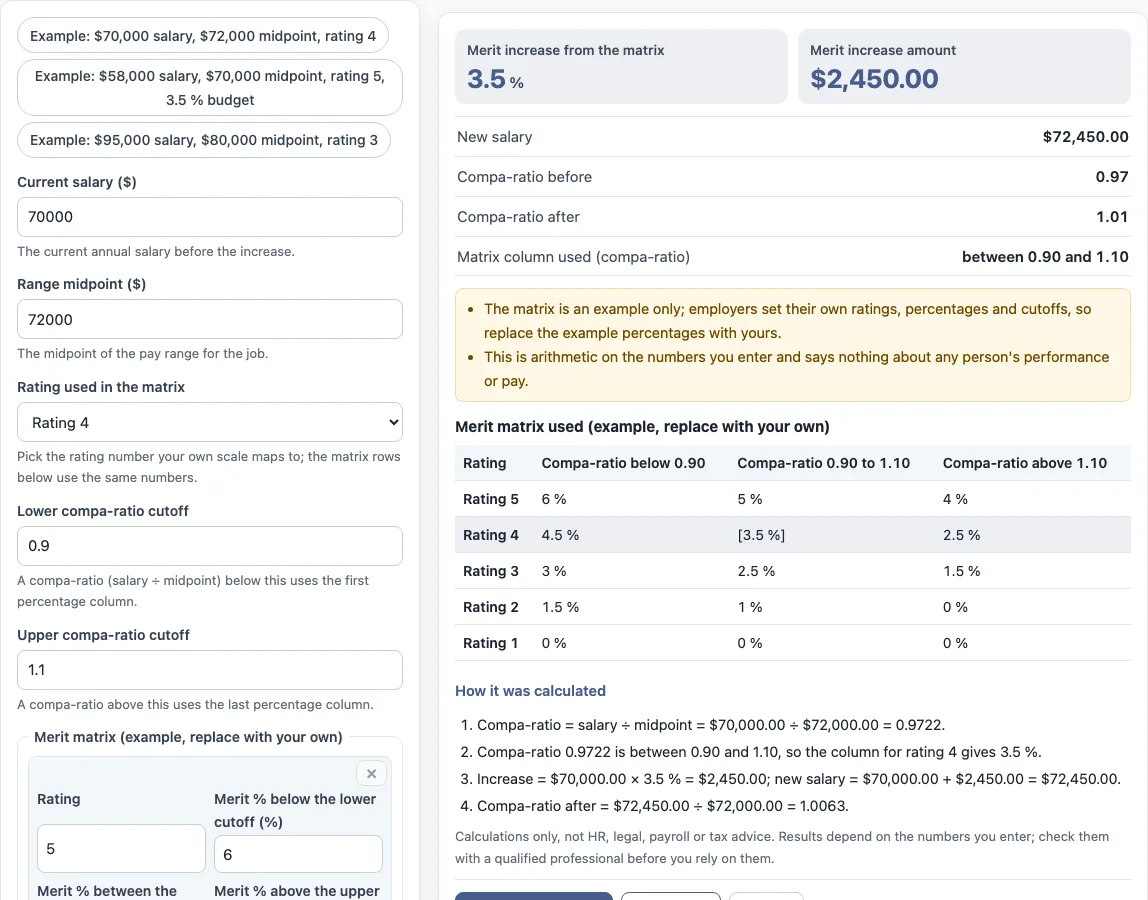
How to use the merit increase calculator
- Enter the “Current salary ($)”, which is the annual salary before the increase.
- Enter the “Range midpoint ($)” for the job.
- Choose the “Rating used in the matrix” that matches your own scale, from “Rating 1” to “Rating 5”. The matrix rows use the same numbers.
- Check the “Lower compa-ratio cutoff” and “Upper compa-ratio cutoff”. These decide which percentage column is used.
- Replace the example percentages in the “Merit matrix (example, replace with your own)” table. Use “+ row” to add a line and × to remove one.
- Optional: under “More options”, enter “Total payroll (optional) ($)” and “Merit budget (optional) (%)” to get a “Merit budget amount”.
- Read the results: “Merit increase from the matrix”, “Merit increase amount”, “New salary”, “Compa-ratio before”, “Compa-ratio after” and “Matrix column used (compa-ratio)”.
The three example buttons fill the form with sample values, and “Reset” restores the example values. The values in the form are not real company data, so replace every one with your own numbers. “How it was calculated” under the result lists each step with your numbers. “Print / save result” prints a one-page sheet with the inputs, results, steps and date; save it as PDF from the print dialog. “Copy link” copies a link that reopens the same inputs.
How to calculate merit increase?
To calculate a merit increase, divide the salary by the range midpoint to get the compa-ratio, find the band the compa-ratio falls in, read the percentage for the rating, and multiply the salary by that percentage. The merit budget, when a payroll and budget percentage are entered, is payroll × budget % ÷ 100.
In the tool’s worked example, a $70,000 salary and a $72,000 midpoint give a compa-ratio of 0.9722. That falls between 0.90 and 1.10, so the column for rating 4 gives 3.5 %. The increase is $70,000.00 × 3.5 % = $2,450.00, the new salary is $72,450.00, and the compa-ratio after is 1.0063.
What is a merit matrix?
A merit matrix gives a merit increase percentage from two inputs: a performance rating and the employee’s position in the pay range, measured by compa-ratio (pay ÷ midpoint). Each row is a rating and each column is a band of compa-ratio.
In the tool, a compa-ratio below the lower cutoff uses the first percentage column, a compa-ratio between the cutoffs uses the middle column, and a compa-ratio above the upper cutoff uses the last column. Employers set their own ratings, percentages and cutoffs, and organisations define these differently, so a matrix from one organisation may not match another.
Is the example matrix a recommendation?
No. The matrix in the tool is an editable example, not a recommendation, and its percentages are placeholders. A merit matrix template is only a starting layout until you enter the percentages your own policy uses.
The tool does not say which percentage is right for any rating or pay position. It only applies the matrix you enter to the numbers you enter.
How does the merit budget work?
The merit budget is the payroll multiplied by the budget percentage: payroll × budget % ÷ 100. It is an optional extra under “More options”, and it appears only when both a payroll and a budget percentage are filled in. The preset “Example: $58,000 salary, $70,000 midpoint, rating 5, 3.5 % budget” shows it. The budget is a separate figure from one person’s increase. The tool does not add up individual increases or compare them with the budget, so you would do that outside the tool.
What happens at the cutoffs?
The cutoffs decide which column of the matrix is used. A compa-ratio below the lower cutoff uses the first percentage column, one above the upper cutoff uses the last column, and anything else, including a value exactly at a cutoff, uses the middle column. The default cutoffs are 0.90 and 1.10 and you can change them. In the third preset, a $95,000 salary against an $80,000 midpoint gives a compa-ratio of 1.1875, above the upper cutoff, so the last column for rating 3 applies and the increase is $95,000 × 1.5 % = $1,425.
Sources: Wikipedia: Merit pay.
Frequently asked questions
Is the merit increase calculator free to use?
Yes. It is free, runs in your browser, and needs no account or sign-up.
Does the tool save what I type?
Nothing you type is uploaded. The page address keeps your inputs after any change, so a link you copy with “Copy link” reopens the same values.
Can I use the results in commercial work?
Yes. Results may be used in HR reports, policies, board packs and client documents without attribution.
Does the tool calculate tax, take-home pay or a prorated increase?
No. The tool is arithmetic only and does not calculate tax, take-home pay, sick pay or any legal entitlement. Its controls do not include a proration option, so a prorated figure has to be worked out separately.
What is a compa-ratio?
A compa-ratio is salary divided by the range midpoint. In the worked example, $70,000 ÷ $72,000 gives 0.9722, and the compa-ratio after the increase is 1.0063.
Can I change the ratings, percentages and cutoffs?
Yes. The matrix rows are editable, and so are the “Lower compa-ratio cutoff” and “Upper compa-ratio cutoff”. The values shown at first are an example, so replace them with the ones in your own policy.
Which rating should I choose?
The tool does not know what a rating means in your organisation. Pick the row that matches the rating your own process produced. The tool only reads the percentage in that row.
Does the new compa-ratio include the merit increase?
Yes. “Compa-ratio after” is the new salary divided by the same midpoint. In the worked example it is $72,450 ÷ $72,000 = 1.0063.
Related tools
- Pay raise calculator: use it to work out a raise amount when you are not applying a merit matrix.
- Salary increase percentage calculator: use it to find the percentage change between an old salary and a new one.
- Cost of living raise calculator: use it to work out a raise amount for a cost-of-living adjustment rather than a merit increase.
- Salary growth calculator: use it to see how a salary changes over several years at a set rate.
- Compa ratio calculator: use it when you only need the salary ÷ midpoint figure.
- FTE salary calculator: use it to convert a salary for a part-time or full-time equivalent position.
- Pay scale calculator: use it to work through amounts within a pay scale.