FTE Hours Calculator
Enter hours worked and the full-time hours to get the FTE, or the reverse.
Recent
Your last 10 settings, saved only in this browser. Nothing is uploaded.
How to use the FTE hours calculator
- Under “What to work out”, choose “FTE from hours worked” if you know the hours, or “Hours from an FTE value” if you know the FTE.
- Under “Period the hours cover”, pick “Week”, “Month” or “Year”. The hours worked and the full-time hours must both be for this period.
- If you chose “FTE from hours worked”, enter the total in “Hours worked in the period”. If you chose “Hours from an FTE value”, enter the fraction in “FTE value”, for example 0.5 for half-time.
- In “Full-time hours for the period”, enter the full-time hours from the employment contract or schedule. Leave it blank to use 40 a week, 173.33 a month or 2,080 a year, following the period you chose.
- Read the results: “FTE”, “Hours in the period”, “Hours per week”, “Hours per month” and “Hours per year”. Under the result, “How it was calculated” lists each step with your numbers.
- Replace every example value with your own before you use the result.
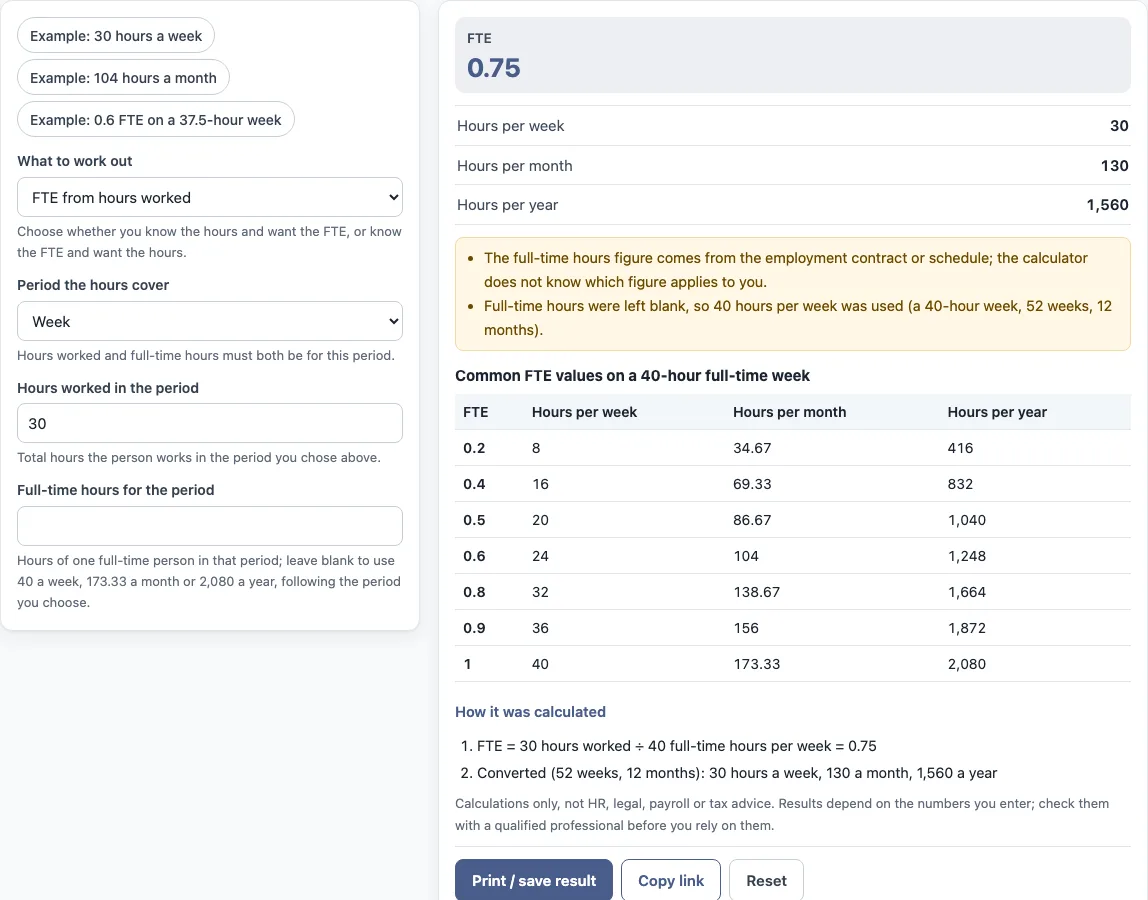
The three preset buttons, “Example: 30 hours a week”, “Example: 104 hours a month” and “Example: 0.6 FTE on a 37.5-hour week”, fill the form with sample values so you can see how each mode works. “Print / save result” prints a one-page sheet with the inputs, results, calculation steps and date; choose save as PDF in the print dialog. “Copy link” copies a link that reopens the same inputs, and the page address keeps your inputs after any change. “Reset” restores the example values.
How do you calculate FTE hours?
FTE is the hours worked divided by the full-time hours for the same period. An FTE of 0.5 means half of a full-time schedule. Both figures must cover the same period, so weekly hours go with weekly full-time hours, and monthly hours go with monthly full-time hours.
The tool’s own example shows the working: 30 hours worked ÷ 40 full-time hours per week = 0.75. Full-time hours come from the employment contract or schedule, and organisations or contracts may define full-time differently, so use the figure that applies to the person.
How to calculate FTE from hours?
Work through these steps:
- Write down the hours worked in the period, such as a week.
- Write down the full-time hours for that same period.
- Divide the hours worked by the full-time hours.
The result is the FTE. Enter the same two figures in the tool under “FTE from hours worked”, and the result appears as “FTE”.
How to calculate FTE based on hours?
The full-time hours figure is the base for the calculation, and it changes the result. If “Full-time hours for the period” is left blank, the tool uses 40 hours a week, 173.33 a month or 2,080 a year. Those defaults assume a 40-hour week, 52 weeks and 12 months.
The default is a starting point, not a record of any contract. Enter the full-time hours that apply to the person for each period you work with.
How do I turn an FTE into hours per week?
Multiply the FTE by the full-time hours per week. For example, 0.75 FTE on a 40-hour full-time week gives 30 hours a week. Under “Hours from an FTE value”, the tool performs this step and also converts the weekly figure to a month and a year, using 52 weeks and 12 months. For the same example, 30 hours a week gives 130 hours a month and 1,560 hours a year.
Sources: Wikipedia: Full-time equivalent.
Frequently asked questions
How many hours is 1.0 FTE?
1.0 FTE is the full-time hours for the period you choose. With the default values, that is 40 hours a week, 173.33 hours a month or 2,080 hours a year. If the contract states a different full-time figure, enter it in “Full-time hours for the period”.
Where should I get the full-time hours figure?
Use the employment contract or schedule. The calculator does not know which figure applies to you, and the tool shows this note under the result.
Does the tool upload or keep what I enter?
Nothing you type is uploaded, and the calculator runs in your browser. To return to the same inputs later, use “Copy link”, which copies a link that reopens them.
Can I use the result in an HR report or payroll document?
Results may be used in commercial work, such as HR reports, policies, board packs and client documents, without attribution. The tool does arithmetic only. It gives no HR, legal, payroll or tax advice and does not say what a result means for any person.
Does the period I choose change the FTE?
No. FTE is a ratio, so 30 hours out of 40 in a week and 130 hours out of 173.33 in a month give about the same value. Choose the period you have figures for and keep hours worked and full-time hours in that same period.
Related tools
- FTE calculator: use it when you want to work out FTE from other inputs in the same way.
- FTE salary calculator: use it when you want to look at salary alongside an FTE value.
- Absence rate calculator: use it when you want to measure absence against the hours a team works.
- Span of control calculator: use it when you want to count the people a manager leads.
- Turnover rate calculator: use it when you want to measure how many people leave over a period.
- Cost per hire calculator: use it when you want to total the cost of recruiting one person.