FTE Calculator
List your full-time staff and part-time groups to get the total full-time equivalent (FTE).
Recent
Your last 10 settings, saved only in this browser. Nothing is uploaded.
The FTE calculator works out full-time equivalent (FTE) headcount by turning your full-time staff and part-time groups into one total. You enter full-time employees and any number of part-time groups, then choose the standard method or the US ACA monthly-hours formula. The tool runs in your browser, is free, and needs no account or sign-up.
Part-time work is counted as a fraction of a full-time employee, so five people working half-time count as 2.5 FTE. The results show the total FTE, the FTE from full-time and part-time staff, the number of people, and a table with the FTE for each group.
How to use the FTE calculator
- Choose a method in “Counting method”. Pick “Standard (hours ÷ full-time hours)” or “US ACA monthly-hours formula”.
- If you chose the standard method, enter your figure in “Hours in a full-time week”. This is the hours per week of one full-time employee in your organisation. This field appears only with the standard method.
- Enter your number in “Full-time employees”.
- For each part-time group, enter a label in “Group”, the headcount in “People”, and the weekly hours in “Hours per week”.
- Select “+ Add a group” to add another line. Select × to remove a line.
- Read the results: “Total FTE”, “FTE from full-time employees”, “FTE from part-time employees”, and “Number of people”. Check the table of FTE by group and the “How it was calculated” steps under the result.
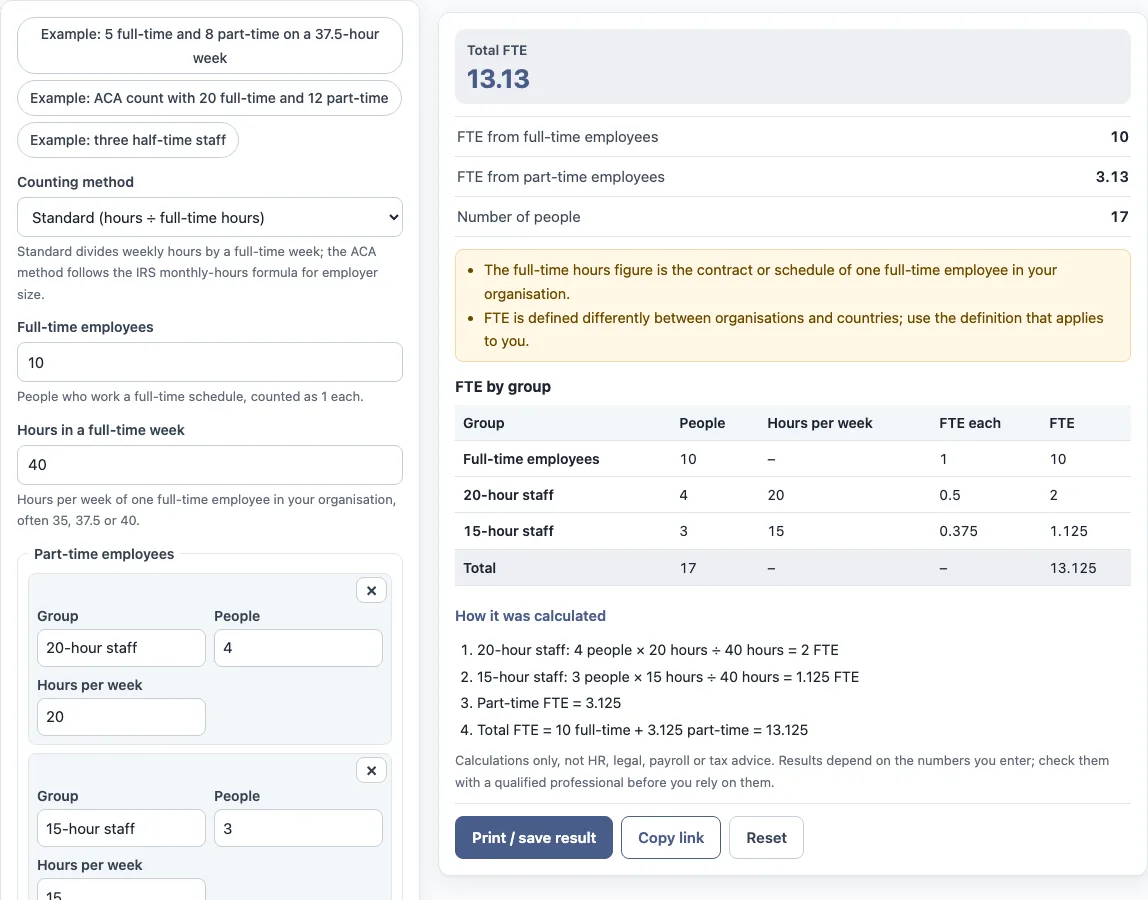
The form starts with example values, so replace every one with your own numbers. You can also select a preset button to load an example, such as “Example: three half-time staff”. The default values produce a Total FTE of 13.13 from 17 people.
Select “Print / save result” to print a one-page sheet with your inputs, results, calculation steps and the date. You can save it as a PDF from the print dialog. Select “Copy link” to copy a link that reopens the same inputs. Select “Reset” to restore the example values.
How do you calculate full time equivalent (FTE) employees? How do you figure, figure out, find, count, compute, estimate, work out or determine FTE?
FTE is calculated by converting each part-time group into a fraction of one full-time employee and adding that to the full-time count. With the standard method, each part-time group’s FTE equals the number of employees multiplied by their hours per week, divided by the hours in a full-time week. The total FTE is the number of full-time employees plus the part-time FTE.
The worked example shows this. Four people working 20 hours a week, divided by a 40-hour full-time week, gives 2 FTE. Three people working 15 hours a week gives 1.125 FTE. Together the part-time FTE is 3.125. With 10 full-time employees, the total is 13.125, which the tool displays as 13.13.
The full-time hours figure should match the contract or schedule of one full-time employee in your organisation. FTE is defined differently between organisations and countries, so use the definition that applies to you.
How is the ACA full-time equivalent method different from the standard method?
The ACA method follows the monthly-hours formula the IRS describes for the US Affordable Care Act employer-size test. The standard method divides each group’s hours by a full-time week you enter. The ACA method works in monthly hours instead, and it has its own rules for who counts as full-time.
Under the ACA method, full-time means 30 or more hours a week. Each part-time employee’s monthly hours are capped at 120. The FTE is the total part-time monthly hours divided by 120. Monthly hours equal hours per week multiplied by 52, divided by 12. The ACA test also has further rules, including seasonal workers, hours of service and the 50-FTE threshold, and the tool does not apply those.
What do figuring FTE and FTE computation mean?
Figuring FTE, figuring out FTE, determining FTE and FTE computation all describe the same step: turning part-time hours into a fraction of one full-time employee. The tool does that computation for each part-time group and adds the results, so calculating full time equivalent staff for a team takes one row per group of people who work the same hours. The result is a head count measured in full-time units, which is why it is usually lower than the number of people on the payroll when part-time staff are included.
Sources: IRS: Determining if an employer is an Applicable Large Employer, IRS: Identifying full-time employees, Wikipedia: Full-time equivalent.
Frequently asked questions
Does the tool give ACA compliance advice?
No. The tool follows the ACA monthly-hours formula as arithmetic only. It does not say whether your organisation meets any ACA requirement, and the ACA test includes rules the tool does not cover.
How do I calculate FTE employees?
Enter your full-time employees, then add each part-time group with its headcount and hours per week. The table shows the FTE for each group, and “Total FTE” gives the combined figure.
Does the tool calculate pay or tax?
No. It is arithmetic only. It does not calculate pay, take-home pay, tax, sick pay or any legal entitlement, and it does not say what a result means for any person.
Can I use the results in reports or policies?
Yes. You can use results in commercial work, such as HR reports, policies, board packs and client documents, without attribution. Check your inputs first, because the values in the form are examples.
Is my data uploaded when I use the tool?
Nothing you type is uploaded. The tool runs in your browser. The “Copy link” option keeps your inputs in a link, so anyone with that link can reopen the same numbers.
Why might my FTE differ from another organisation’s?
FTE is defined differently between organisations, contracts and countries. The tool uses the full-time hours and method you choose, so the result reflects those settings.
Related tools
- Turnover rate calculator: use it to work out how many leavers a period produced relative to headcount.
- Annual turnover rate calculator: use it when you want the turnover rate over a full year.
- Employee retention rate calculator: use it to find the share of staff kept over a period.
- Attrition rate calculator: use it to measure the rate at which employees leave.
- Cost of turnover calculator: use it to estimate what leaving staff cost your organisation.
- Cost per hire calculator: use it to work out what it costs to fill a position.
- Absence rate calculator: use it to measure how much scheduled time is lost to absence.