Employee Retention Rate Calculator and Formula
Enter the starting headcount and who left to get the employee retention rate.
Recent
Your last 10 settings, saved only in this browser. Nothing is uploaded.
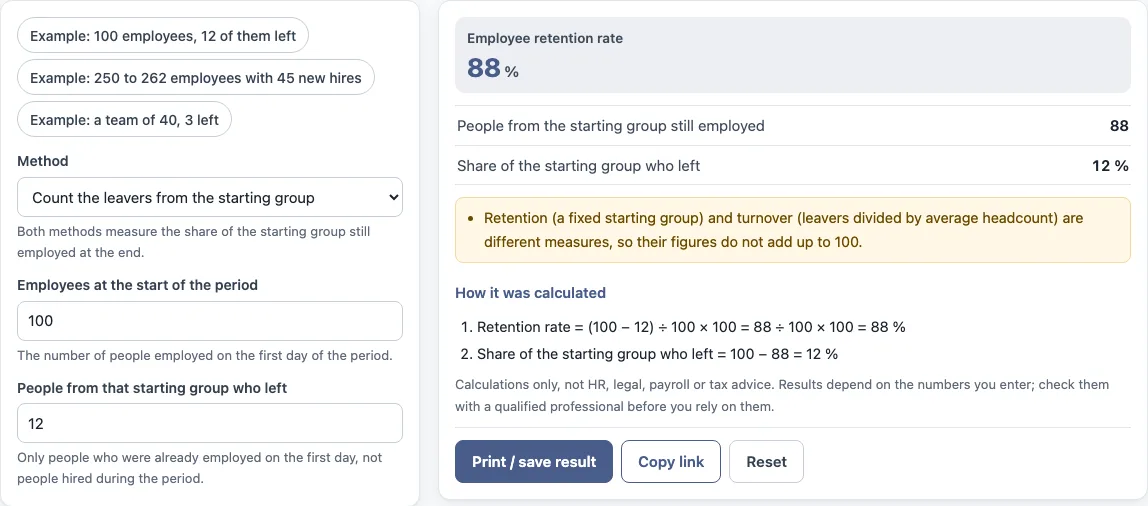
How to use the employee retention rate calculator
- Choose a method. Select “Count the leavers from the starting group” to count people who left, or “Use end headcount minus new hires” to use the end headcount. Both measure the share of the starting group still employed at the end.
- Enter “Employees at the start of the period”. This is the number of people employed on the first day of the period.
- If you chose the leavers method, enter “People from that starting group who left”. Count only people who were already employed on the first day, not people hired during the period.
- If you chose the end headcount method, enter “Employees at the end of the period” and “New hires during the period”. New hires are people who joined during the period and were still employed on its last day.
- Read the results: “Employee retention rate”, “People from the starting group still employed” and “Share of the starting group who left”.
- Open “How it was calculated” to see each step of the formula with your numbers.
To try the tool first, click one of the preset buttons: “Example: 100 employees, 12 of them left”, “Example: 250 to 262 employees with 45 new hires” or “Example: a team of 40, 3 left”. “Reset” restores the example values. “Copy link” copies a link that reopens the same inputs. “Print / save result” prints a one-page sheet with the inputs, results, calculation steps and date. To keep a PDF, choose save as PDF in the print dialog.
How do you calculate employee retention rate, and how to calculate retention rate of employees?
To calculate employee retention rate, divide the number of people from a fixed starting group who are still employed at the end by the headcount at the start, then multiply by 100. The formula is (headcount at the start − people from that group who left) ÷ headcount at the start × 100. The tool’s default example shows the working: with 100 employees at the start and 12 of them left, (100 − 12) ÷ 100 × 100 = 88 %. The share who left is 100 − 88 = 12 %.
Only people employed on the first day belong to the starting group. Staff hired during the period are not counted in this method. Searches for the retention formula, staff retention rate formula, labour retention rate formula or retention calculation all refer to this calculation. Customer or revenue retention is a different measure and is not calculated here.
What is the end minus new hires method?
The end minus new hires method calculates retention from the end headcount instead of a count of leavers. The formula is (headcount at the end − new hires) ÷ headcount at the start × 100. New hires are people who joined during the period and were still employed on its last day. Subtracting them from the end headcount removes staff who were not in the starting group, so the top figure is intended to show the starting group still employed.
Both methods measure the same thing, the share of the starting group still employed at the end, and the tool lets you pick either one. Use whichever matches the figures you have. Click the “Example: 250 to 262 employees with 45 new hires” preset to see this method’s steps with sample values.
Where an organisation, policy or contract defines retention or its inputs differently, follow that definition. The tool uses the formulas above only.
Retention depends on the starting group, so the same leavers give a different figure if the starting headcount changes.
Sources: Wikipedia: Employee retention.
Frequently asked questions
Is retention the same as 100 minus turnover?
No. Retention is about a fixed starting group, while turnover is leavers divided by average headcount. They are different measures, so their figures do not add up to 100. The tool shows this note under the result.
Does this tool calculate customer or client retention?
No. It calculates employee retention only. Customer or revenue retention is a different measure and is not calculated here.
Why are new hires left out of the leavers method?
The leavers method counts only people employed on the first day of the period. Anyone hired during the period was not part of the starting group, so they are not included in the count of people who left.
Can I use the results in reports or documents?
Yes. Results may be used in commercial work, such as HR reports, policies, board packs and client documents, without attribution. The tool gives no HR, legal, payroll or tax advice and does not say what a result means for any person.
Are the numbers in the form real company data?
No. The values already in the form are examples. Replace every one with your own numbers before you use the results.
Related tools
- Turnover rate calculator: use it to find leavers divided by average headcount, a measure that is different from retention.
- Annual turnover rate calculator: use it when you want turnover measured over a full year.
- Attrition rate calculator: use it when you need attrition figures for a period.
- Cost of turnover calculator: use it to estimate the cost of staff leaving.
- Cost per hire calculator: use it to work out what each new hire costs.
- Absence rate calculator: use it to measure staff absence over a period.
- FTE calculator: use it to convert working hours into full-time equivalent figures.