Employee Cost Calculator
Enter the salary and the other costs of an employee to see the total cost per year, per month and per hour.
Recent
Your last 10 settings, saved only in this browser. Nothing is uploaded.
How to use the Employee cost calculator
- Enter the “Annual salary” and any “Annual bonus or commission”.
- Enter “Employer payroll taxes and contributions” as a percentage of pay. Use the rate that applies to your business; the 8% in the first example is only a placeholder.
- Enter the “Employer retirement contribution” as a percentage of pay, or 0 if there is none.
- Enter the “Benefits per month”, such as health cover, and the yearly “Equipment and software” and “Training”.
- Enter the “Space and admin overhead per year” that you assign to this person.
- Open “More options” to change the “Working hours per year” used for the cost per hour. The default is 2,080.
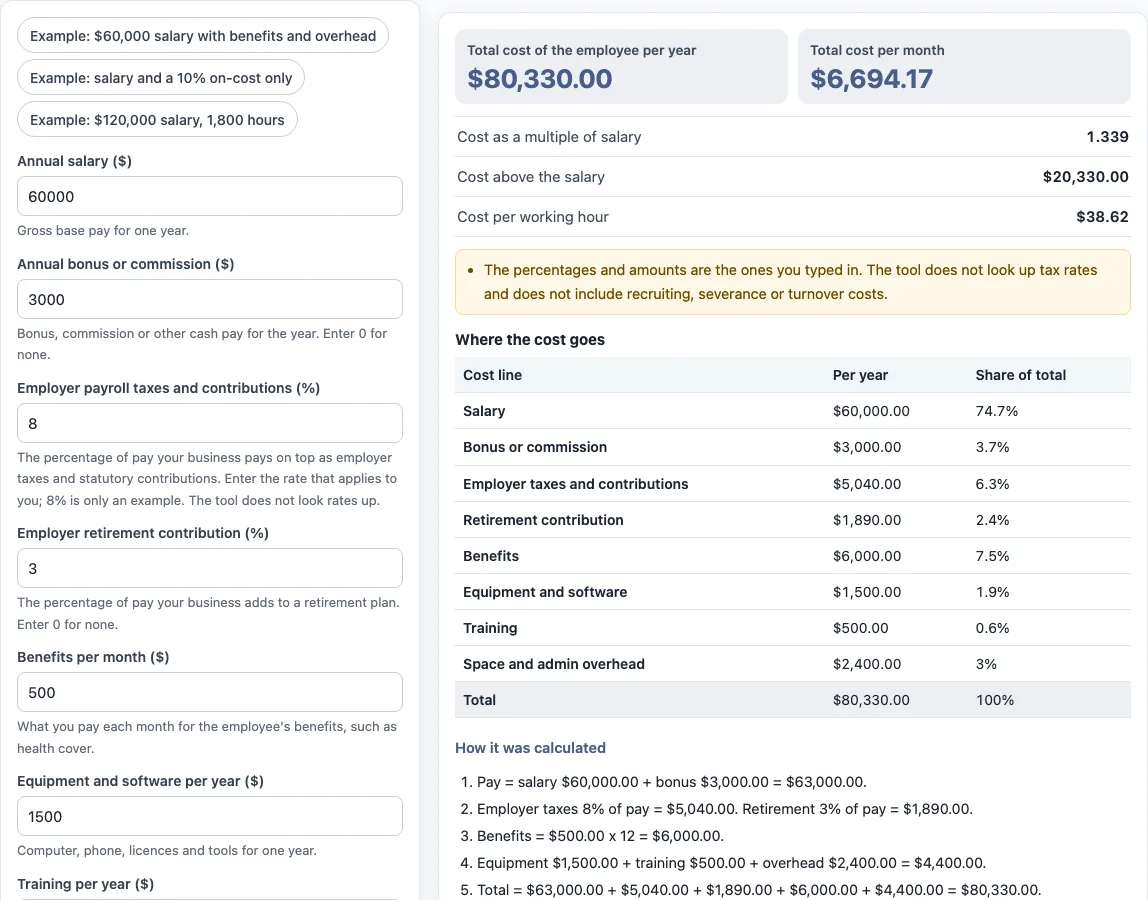
- Read the results: total cost per year and per month, the multiple of salary, the cost above salary and the cost per working hour. The table lists each cost line with its share of the total, and “How it was calculated” shows the steps.
Three presets load examples, “Copy link” reopens your inputs, and “Reset” restores the first example. The first example is a $60,000 salary with benefits and overhead, the second is salary plus a 10% on-cost and equipment only, and the third is a $120,000 salary on 1,800 working hours. “Print / save result” makes a one-page sheet that you can save as a PDF. Replace the examples with your own figures before you use a result.
How do you calculate the total cost of an employee?
Add every cost of employing the person for a year. In the default example the salary is $60,000 and the bonus is $3,000, so pay is $63,000. Employer taxes at 8% are $5,040 and the retirement contribution at 3% is $1,890, both taken on the pay of $63,000. Benefits are $500 × 12 = $6,000. Equipment $1,500, training $500 and overhead $2,400 add $4,400. The total is $63,000 + $5,040 + $1,890 + $6,000 + $4,400 = $80,330 a year, or $6,694.17 a month.
What is the cost multiple?
The multiple is the total cost divided by the salary. In the example it is $80,330 / $60,000 = 1.339, so the employee costs about 1.34 times the salary, or $20,330 more. The multiple depends on your own inputs, so there is no standard figure. Two businesses with the same salary can have different multiples because their taxes, benefits and overhead differ.
How is the cost per hour worked out?
The total yearly cost is divided by the working hours per year. At 2,080 hours the example costs $80,330 / 2,080 = $38.62 an hour. The cost per hour is higher than the wage per hour because it includes everything else. If you want the cost per hour actually worked, enter fewer hours so that leave and holidays are left out.
Which costs are not included?
The tool leaves out recruiting, onboarding, severance and the cost of replacing someone. To estimate those, use the cost per hire calculator and the cost of turnover calculator on this site. It also does not look up tax rates, so check the percentage for your own country and payroll set-up.
How do the percentages work?
Employer taxes and the retirement contribution are both a percentage of pay, where pay means salary plus bonus. A bonus of $3,000 therefore raises the employer tax by 8% of $3,000, which is $240, and the retirement contribution by $90. If your retirement plan is based on salary only, enter a lower percentage that gives the same dollar amount.
What belongs in overhead?
Overhead is the share of costs that are not specific to the person but that you assign to them, such as office space, supplies and administration. How you split it is a business decision, so enter 0 if you want to see only direct costs.
Frequently asked questions
What employer tax rate should I enter?
The tool does not provide one. Employer taxes and contributions depend on the country, the pay and the type of employment. Use the figure from your payroll provider or accountant.
Does it include recruiting costs?
No. Recruiting is a one-time cost, and the cost per hire calculator covers it. This tool shows the yearly cost of having the employee.
Can I use it for a part-time employee?
Yes. Enter the actual salary and set the working hours per year to the person’s hours, for example 1,040 for 20 hours a week. The cost per hour then uses those hours.
Why is my total higher than I expected?
Each line adds to the total, and the percentages apply to pay including the bonus. The table shows every line and its share, so you can see which cost is largest.
Does the tool save my numbers?
No. It runs in your browser and nothing is uploaded. Use “Copy link” or “Print / save result” to keep a calculation.
Can I use the results in a budget or report?
Yes, in commercial work without attribution. The tool only does arithmetic, so check the figures against your payroll records.
Related tools
- Cost of turnover calculator: use it to add up what a departure costs.
- Cost per hire calculator: use it to total recruiting costs.
- FTE salary calculator: use it to convert pay to full-time equivalent.
- Severance pay calculator: use it to turn a severance formula into an amount.
- Pay raise calculator: use it to see pay after a raise.
- Salary range calculator: use it to work out the midpoint of a pay range.