Cost per Hire Calculator
Enter the recruiting costs and the number of hires to get the cost per hire.
Recent
Your last 10 settings, saved only in this browser. Nothing is uploaded.
The cost per hire calculator works out how much one hire costs your organisation, in dollars. It adds your internal recruiting costs to your external recruiting costs, then divides the total by the number of people hired in the same period. The tool runs in your browser, is free, and needs no account or sign-up.
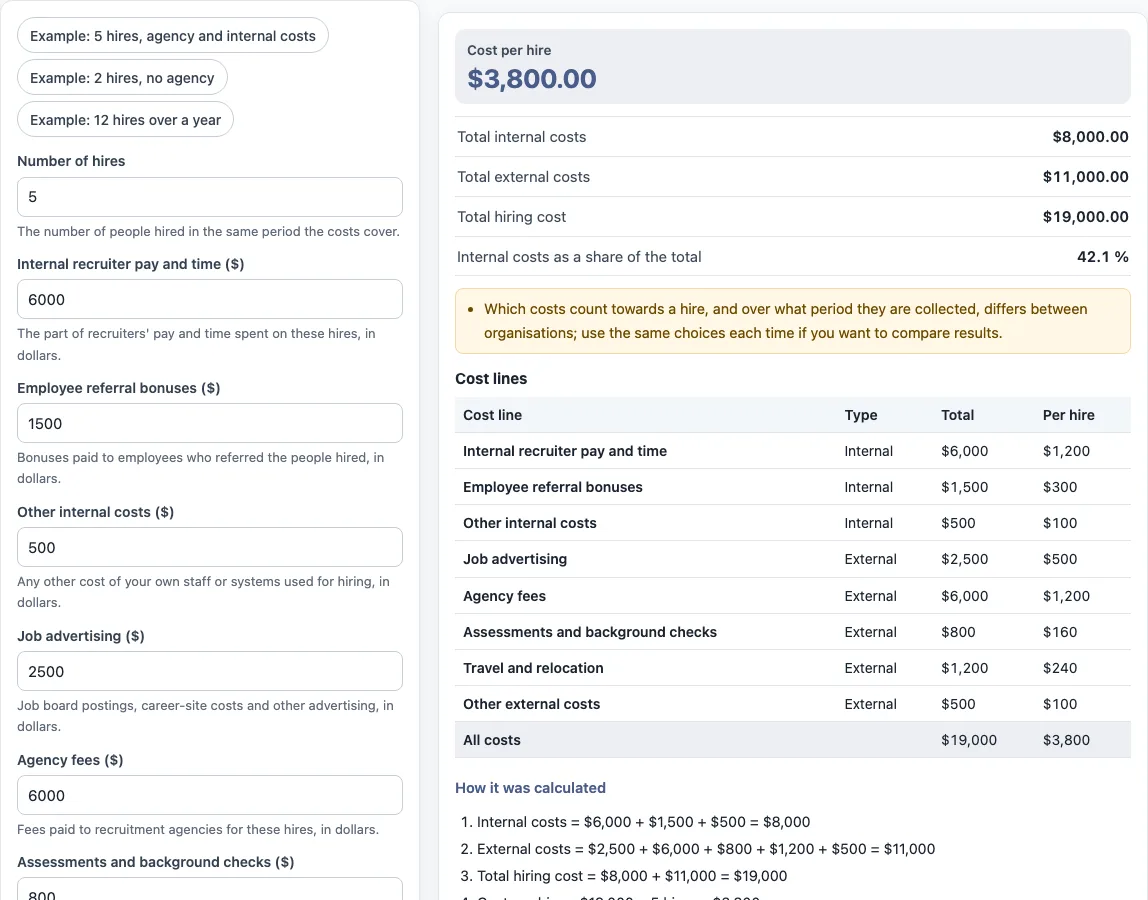
You enter the number of hires and the cost of each recruiting activity, such as recruiter time, job advertising or agency fees. The results show the cost per hire, the total internal costs, the total external costs, the total hiring cost and the internal costs as a share of the total. A table lists each cost line so you can see how the figures were built.
The values already in the form are an example, not real company data. Replace every one with your own numbers.
How to use the cost per hire calculator
- Set “Number of hires” to the number of people hired in the period your costs cover.
- Enter “Internal recruiter pay and time ($)”, “Employee referral bonuses ($)” and “Other internal costs ($)”.
- Enter “Job advertising ($)”, “Agency fees ($)”, “Assessments and background checks ($)”, “Travel and relocation ($)” and “Other external costs ($)”. Enter 0 for any cost that does not apply to these hires.
- Read “Cost per hire”, “Total internal costs”, “Total external costs”, “Total hiring cost” and “Internal costs as a share of the total”.
- Check the cost lines table and the “How it was calculated” section under the result, which lists each step with your numbers.
- Select “Print / save result” to print a one-page sheet with the inputs, results, calculation steps and date. To keep a PDF, choose save as PDF in the print dialog.
- Select “Copy link” to copy a link that reopens the same inputs. Select “Reset” to restore the example values.
The three “Example” buttons fill the form with sample values: “Example: 5 hires, agency and internal costs”, “Example: 2 hires, no agency” and “Example: 12 hires over a year”. The page address keeps your inputs after any change. Nothing you type is uploaded.
Enter 0 for any cost line that does not apply; blank lines also count as 0.
Cost per hire formula
The cost per hire formula divides all recruiting costs by the number of hires. Cost per hire = (total internal recruiting costs + total external recruiting costs) ÷ number of hires. Searches for a recruitment cost per hire formula refer to this same calculation.
First add up the internal costs and the external costs. Then add those two totals together and divide by the number of people hired in the same period.
What counts as an internal and an external recruiting cost?
Internal costs are costs of your own staff or systems used for hiring. In the tool these are the recruiter pay and time spent on the hires, employee referral bonuses, and other internal costs. External costs are amounts paid to outside parties. In the tool these are job advertising and career-site costs, agency fees, assessments and background checks, candidate travel and relocation, and other external costs.
Which costs count towards a hire differs between organisations. Decide on your definition before you start, and use the same definition each time you compare results.
Which period should the costs cover?
The costs must cover the same period as the number of hires. The tool divides total costs by the hires made in the period you enter, so mixing periods gives a figure that does not match either one.
Organisations choose their own period, such as a single vacancy or a full year. The preset “Example: 12 hires over a year” shows one way to set this up. Use the same period each time you compare results.
Cost per hire calculation example
The tool’s default values give these steps:
- Internal costs = $6,000 + $1,500 + $500 = $8,000
- External costs = $2,500 + $6,000 + $800 + $1,200 + $500 = $11,000
- Total hiring cost = $8,000 + $11,000 = $19,000
- Cost per hire = $19,000 ÷ 5 hires = $3,800
- Internal share = $8,000 ÷ $19,000 × 100 = 42.11 %, shown as 42.1 %
These are sample values, so replace them with your own figures to get a result for your organisation.
Sources: Wikipedia: Cost per hire.
Frequently asked questions
What counts as an internal and an external recruiting cost?
Internal costs are your own staff and system costs for hiring, such as recruiter pay and time, referral bonuses and other internal costs. External costs are paid to outside parties, such as job advertising, agency fees, assessments and background checks, travel and relocation, and other external costs. Definitions differ between organisations, so compare results only when they use the same definition.
Which period should the costs cover?
The costs must cover the same period as the number of hires you enter in “Number of hires”. Organisations choose their own period, so use the same choice each time you compare results.
Is the cost per hire calculator free to use?
Yes. The tool is free, runs in your browser, and needs no account or sign-up. Nothing you type is uploaded.
Can I use the results in reports or client documents?
Yes. Results may be used in commercial work, such as HR reports, policies, board packs and client documents, without attribution. The tool is arithmetic only. It gives no HR, legal, payroll or tax advice and does not say what a result means for any person.
Does the tool use salary data to fill in recruiter costs?
No. Enter the recruiter pay and time yourself in “Internal recruiter pay and time ($)”. The tool does not use market or salary survey data and does not look up pay scales.
Related tools
- Turnover rate calculator: use it to work out how many leavers an organisation has over a set period.
- Annual turnover rate calculator: use it when you want the leaving rate across a full year.
- Employee retention rate calculator: use it to see the share of staff who stayed over a period.
- Attrition rate calculator: use it to measure the rate at which staff leave through all causes.
- Cost of turnover calculator: use it to estimate the cost of staff leaving, which is a separate figure from the cost of hiring.
- Absence rate calculator: use it to work out the share of working time lost to absence.
- FTE calculator: use it to convert hours or headcount into full-time equivalent figures.