Cost of Turnover Calculator
Enter your cost for each part of replacing someone to get the cost per leaver and the total.
Recent
Your last 10 settings, saved only in this browser. Nothing is uploaded.
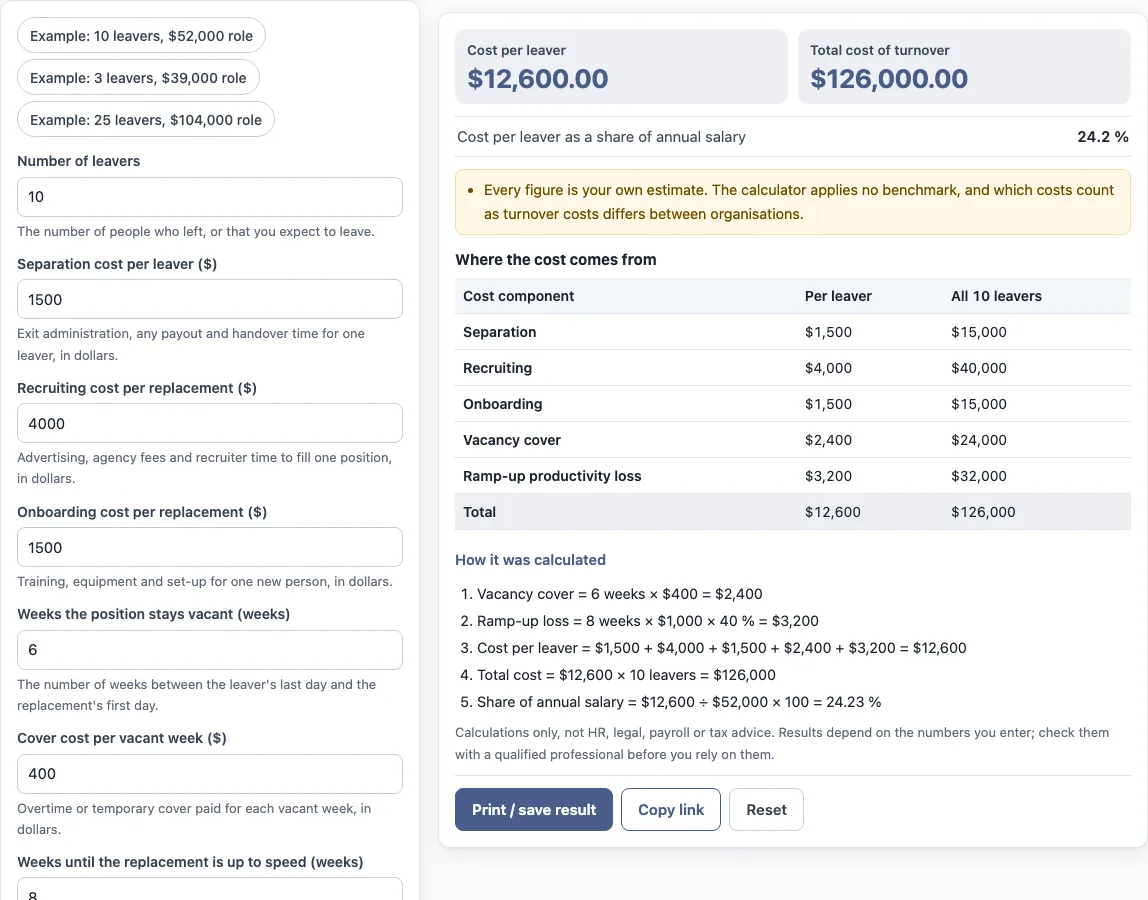
How to use the cost of turnover calculator
- Enter the “Number of leavers” for the period you are measuring, or the number you expect to leave.
- Enter the “Separation cost per leaver ($)” for exit administration, any payout and handover time.
- Enter the “Recruiting cost per replacement ($)” for advertising, agency fees and recruiter time.
- Enter the “Onboarding cost per replacement ($)” for training, equipment and set-up.
- Enter the “Weeks the position stays vacant (weeks)” and the “Cover cost per vacant week ($)” for overtime or temporary cover.
- Enter the “Weeks until the replacement is up to speed (weeks)”, the “Weekly pay of the replacement ($)” and the “Share of productivity lost while ramping up (%)”.
- Optional: open “More options” and enter the “Annual salary of the role (optional) ($)” to see the cost per leaver as a share of yearly salary.
- Read “Cost per leaver”, “Total cost of turnover” and the “Where the cost comes from” table, then check “How it was calculated” under the result.
The preset buttons load example values for 10, 3 or 25 leavers. “Reset” restores the example values. “Copy link” copies a link that reopens the same inputs. “Print / save result” prints a one-page sheet with the inputs, results, calculation steps and date. To keep a copy as a file, choose save as PDF in the print dialog.
What does the cost of turnover include?
The cost of turnover is the total of the costs that a departure and its replacement create. This tool counts five components per leaver: separation, recruiting, onboarding, vacancy cover and lost productivity during ramp-up. What counts as a cost of turnover differs between organisations, so the tool adds only the components it lists.
What is the employee turnover cost calculation formula?
The employee turnover cost formula multiplies the cost of one leaver by the number of leavers. The cost per leaver is the sum of the one-off costs plus the weekly costs over the vacancy and ramp-up periods:
Cost per leaver = separation cost + recruiting cost + onboarding cost + vacancy weeks × weekly cover cost + ramp-up weeks × weekly pay × ramp-up productivity loss %
Total cost = cost per leaver × number of leavers
The tool applies this turnover cost formula to your inputs. With the default values, it prints these steps:
- Vacancy cover = 6 weeks × $400 = $2,400
- Ramp-up loss = 8 weeks × $1,000 × 40 % = $3,200
- Cost per leaver = $1,500 + $4,000 + $1,500 + $2,400 + $3,200 = $12,600
- Total cost = $12,600 × 10 leavers = $126,000
- Share of annual salary = $12,600 ÷ $52,000 × 100 = 24.23 %
Does the tool use an average cost of a leaver?
No. The tool uses only the figures you type. Every cost input is your own estimate, and the tool applies no benchmark and no multiple of salary. If you enter an annual salary, the cost per leaver is also shown as a percentage of it. The tool does not say whether any result is high or low.
What do the vacancy and ramp-up costs mean?
Vacancy cover is the cost of getting the work done while a post is empty, for example overtime or temporary cover, entered per week. Ramp-up loss is the pay for the weeks it takes a new person to reach full output, multiplied by the share of productivity lost in that time. Both are estimates the user makes: the tool multiplies the figures you type and does not know your overtime rates or how long a new hire takes to settle in. In the default example the vacancy cover is $2,400 and the ramp-up loss is $3,200, which together are $5,600 of the $12,600 cost per leaver.
Frequently asked questions
Is the cost of turnover calculator free to use?
Yes. It runs in your browser, is free, and needs no account or sign-up. Nothing you type is uploaded.
Can I use the results in an HR report or board pack?
Yes. Results may be used in commercial work such as HR reports, policies, board packs and client documents, without attribution. The tool gives no HR, legal, payroll or tax advice.
Why do the form values not match my company?
The values in the form are an example, not real company data. Replace every one with your own numbers, or select “Reset” to restore the example values.
Does the tool calculate take-home pay, tax or sick pay?
No. The tool is arithmetic only. It does not calculate tax, take-home pay, sick pay or any legal entitlement.
What is the share of annual salary?
If you enter an annual salary, the tool divides the cost per leaver by it and shows the result as a percentage. In the default example $12,600 ÷ $52,000 = 24.23 %. It is only a way of expressing your own estimate.
Can a cost be left at zero?
Yes. Blank cost fields count as 0, so you can leave out any component that does not apply to your organisation.
Related tools
- Turnover rate calculator: use it to measure how many people left over a period, relative to headcount.
- Annual turnover rate calculator: use it when you want the turnover rate expressed across a full year.
- Employee retention rate calculator: use it to see the share of staff who stayed over a period.
- Attrition rate calculator: use it to measure the rate at which staff leave, as a separate figure from turnover cost.
- Cost per hire calculator: use it when you want to work out only the recruiting cost of filling a position.
- Absence rate calculator: use it to measure the share of working time lost to absence.
- FTE calculator: use it to convert hours worked into full-time equivalent positions.