Cost of Living Raise Calculator
Enter your salary and the yearly inflation rates to see the pay that keeps the same buying power.
Recent
Your last 10 settings, saved only in this browser. Nothing is uploaded.
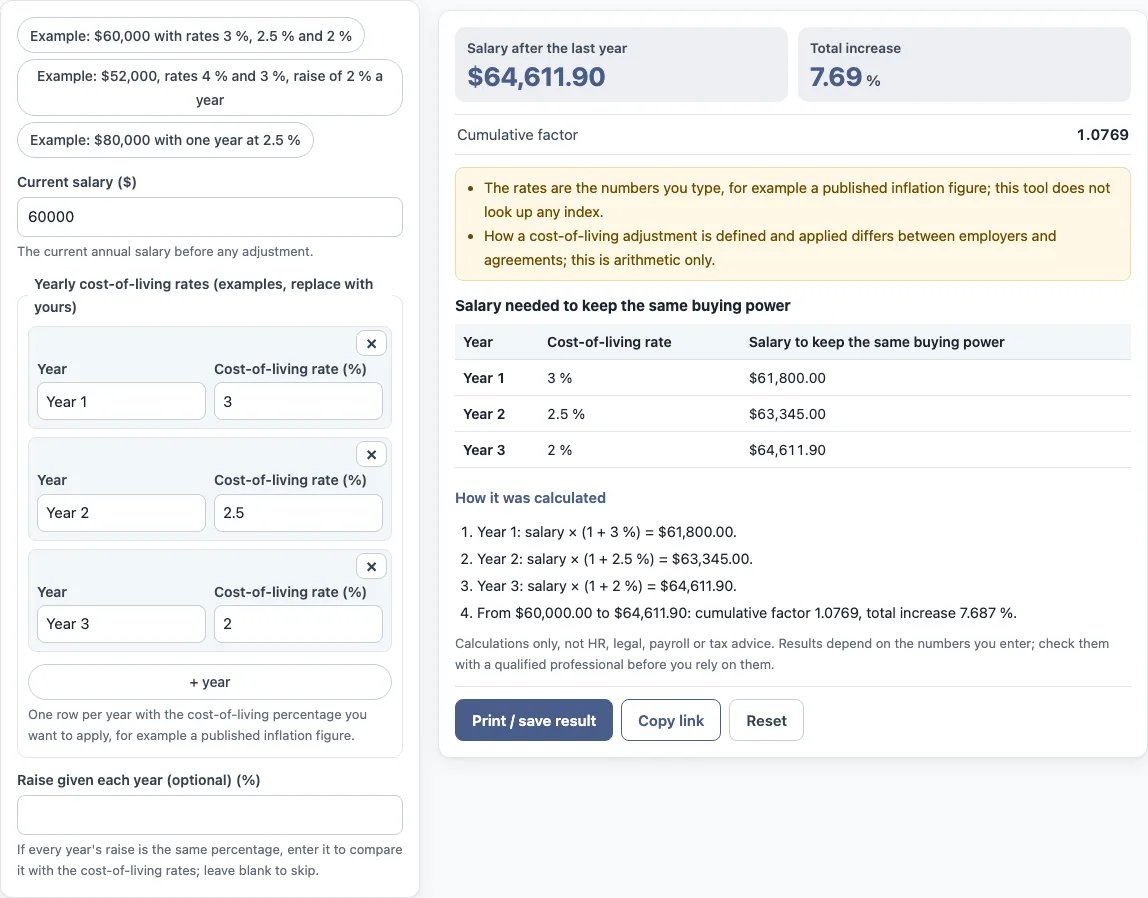
How to use the cost of living raise calculator
- Type your annual salary in “Current salary ($)”.
- In “Yearly cost-of-living rates”, enter one line per year. Type the year and the cost-of-living rate (%) for that year. Select “+ year” to add a line, or × to remove one.
- Optional: if every year’s raise is the same percentage, enter it in “Raise given each year (optional) (%)” to compare it with the cost-of-living rates. Leave it blank to skip this check.
- Read “Salary after the last year”, “Total increase” and “Cumulative factor”. If you entered a raise, read “Change in buying power if the raise is the percentage given each year”.
- Check the table “Salary needed to keep the same buying power” for the rate and salary for each year.
- Open “How it was calculated” under the result to see each step with your numbers.
Three preset buttons load examples: “Example: $60,000 with rates 3 %, 2.5 % and 2 %”, “Example: $52,000, rates 4 % and 3 %, raise of 2 % a year” and “Example: $80,000 with one year at 2.5 %”. “Reset” restores the example values.
“Print / save result” prints a one-page sheet with the inputs, results, calculation steps and the date. Choose “Save as PDF” in the print dialog to keep a copy. “Copy link” copies a link that reopens the same inputs. The page address also keeps your inputs after any change.
What is a cost-of-living adjustment?
A cost-of-living adjustment (COLA) raises pay by an inflation rate. Each year’s salary equals the previous year’s salary multiplied by (1 + that year’s rate). Searches for cost-of-living adjustment, COLA or inflation adjustment refer to this calculation.
How a COLA is defined and applied differs between employers, agreements and countries. This page covers the arithmetic only.
How is the salary after several adjustments worked out?
Apply each year’s rate in order, starting from the current salary. Using the default values, a salary of $60,000 with rates of 3 %, 2.5 % and 2 % gives:
- Year 1: $60,000 × (1 + 3 %) = $61,800.00
- Year 2: $61,800.00 × (1 + 2.5 %) = $63,345.00
- Year 3: $63,345.00 × (1 + 2 %) = $64,611.90
From $60,000.00 to $64,611.90, the cumulative factor is 1.0769 and the total increase is 7.687 %. The cumulative factor is the number you multiply the starting salary by to get the final salary.
How is buying power compared with a raise?
If you enter a raise in “Raise given each year (optional) (%)”, the tool compares it with the cost-of-living rates. It shows the change in buying power as ((1 + raise)^n ÷ product of (1 + rate)) − 1, written as a percentage, where n is the number of years. A positive result means the raises total more than the cost-of-living rates over the same years. A negative result means they total less. The tool does not say what either result means for any person.
What does the table show?
The table “Salary needed to keep the same buying power” lists each year with the rate you entered and the salary that matches the cumulative adjustments up to that year. In the default example the salary needed is $61,800.00 after year 1, $63,345.00 after year 2 and $64,611.90 after year 3. If you also enter a raise given each year, an extra column shows the salary with that raise, so you can compare the two columns line by line.
Which rates should I enter?
Enter the rate that applies to each year, for example a published inflation figure or the adjustment your agreement sets. The tool does not know the rate and does not look it up, so it uses exactly what you type. Rates can be negative, but they must be above −100 %. Use one row per year: add a row with the “+ year” button and remove one with ×.
Sources: Wikipedia: Cost-of-living adjustment.
Frequently asked questions
Does the tool look up inflation?
No. The rates are the numbers you type, for example a published inflation figure. The tool does not look up any index or pay scale.
Can I use the results in a work document?
Yes. Results may be used in commercial work, such as HR reports, policies, board packs and client documents, without attribution.
Is what I type sent anywhere?
The tool runs in your browser, and nothing you type is uploaded.
Does the tool give HR, legal or tax advice?
No. The tool is arithmetic only. It gives no HR, legal, payroll or tax advice, and it does not calculate tax or take-home pay.
Can I use different rates for different years?
Yes. Add one row per year and type the rate for each. The tool applies them in order, so a year with a higher rate raises the salary needed by more.
What is the cumulative factor?
It is the number you multiply the starting salary by to get the salary after the last year. In the default example it is 1.0769, so $60,000 × 1.0769 = $64,611.90 and the total increase is 7.687 %.
What does the buying power result mean?
Only when you enter a raise given each year, the tool compares that raise with the rates and shows the change in buying power as a percentage. It is arithmetic on your numbers and does not say whether any raise is enough.
Related tools
- Pay raise calculator: use it to work out a salary after a single percentage raise.
- Salary increase percentage calculator: use it to find the percentage change between two salary figures.
- Merit increase calculator: use it to work out a salary after a merit-based increase.
- Salary growth calculator: use it to see how a salary grows over several years at a set rate.
- Compa ratio calculator: use it to compare a salary with a reference midpoint.
- FTE salary calculator: use it to convert a salary for a part-time or full-time position.
- Pay scale calculator: use it to work through figures on a pay scale.