Compa Ratio Calculator
Enter the pay and the range midpoint to get the compa-ratio.
Recent
Your last 10 settings, saved only in this browser. Nothing is uploaded.
The compa-ratio calculator divides a pay figure by the midpoint of a pay range and gives you the compa-ratio, the same figure as a percentage of the midpoint, and the difference between pay and the midpoint in dollars. It runs in your browser, is free, and needs no account or sign-up.
You can type the midpoint directly, or enter the range minimum and maximum and let the tool work out the midpoint. A table shows the pay at compa-ratios from 0.80 to 1.20 for the midpoint, so you can see the dollar amount behind each ratio.
The compa-ratio compares two numbers. It is not a rating of a person or their work. The sections below explain the formula, where the midpoint comes from, and how to use each control.
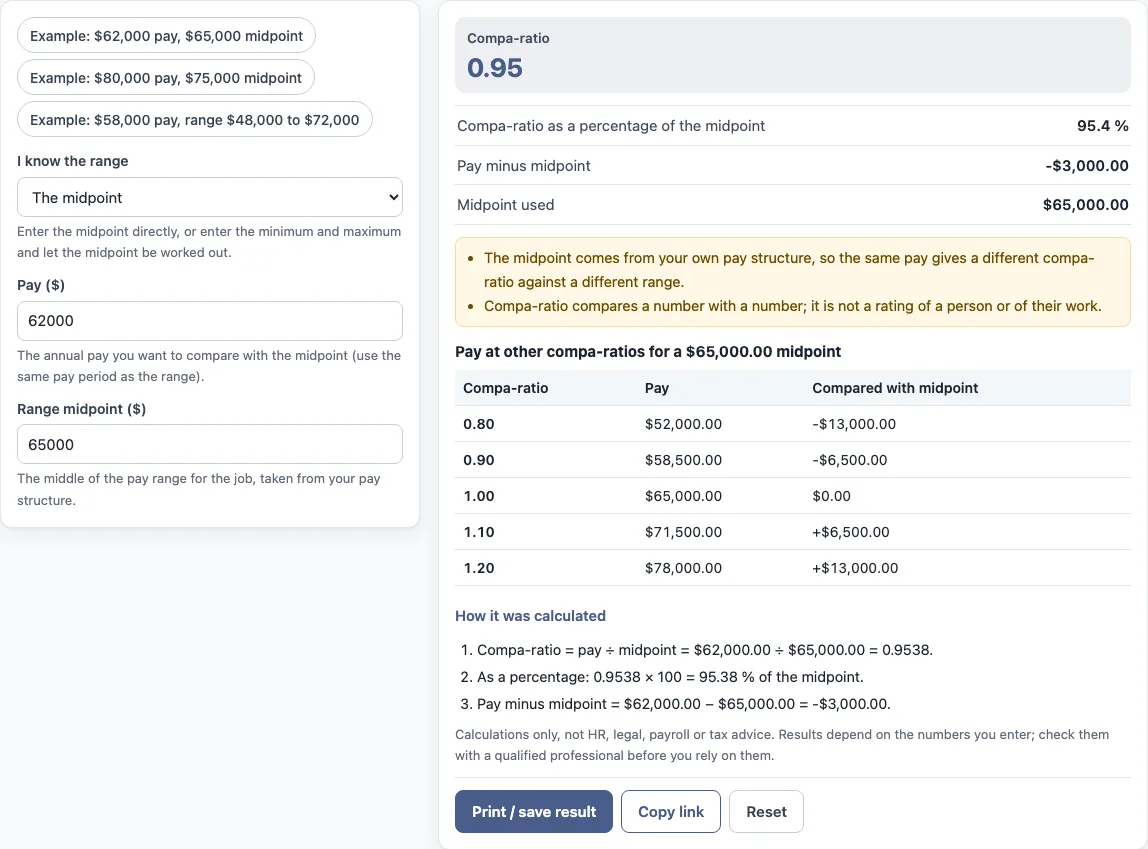
How to use the compa-ratio calculator
- Choose how the midpoint is set: “The midpoint” lets you type the midpoint directly, and “The minimum and maximum” lets the tool work it out.
- Type the annual pay in “Pay ($)”. Use the same pay period as the range.
- If you chose “The midpoint”, type the middle of the pay range in “Range midpoint ($)”. If you chose “The minimum and maximum”, type “Range minimum ($)” and “Range maximum ($)” instead.
- Read the results: “Compa-ratio”, “Compa-ratio as a percentage of the midpoint”, “Pay minus midpoint” and “Midpoint used”.
- Open “How it was calculated” under the result to see each step with your own numbers.
- Check the table of pay at other compa-ratios for the midpoint.
The three preset buttons fill the form with example values. “Reset” restores the example values. The values in the form are examples, not real company data, so replace every one with your own numbers.
“Copy link” copies a link that reopens the same inputs, and the page address keeps your inputs after any change. “Print / save result” prints a one-page sheet with the inputs, results, calculation steps and date. To keep a PDF, choose save as PDF in the print dialog.
Pay and midpoint must use the same pay period, annual or hourly, or the ratio will not mean anything.
What does a compa ratio of 1.0 mean?
A compa-ratio of 1.00 means pay equals the midpoint of the pay range for the role. The ratio is pay divided by the midpoint, so 1.00 means the two figures are the same. A value of 0.90 means pay is 10% below the midpoint, and 1.10 means pay is 10% above it.
The compa-ratio formula is:
Compa-ratio = pay ÷ midpoint
The percentage form multiplies the ratio by 100, so 100% equals the midpoint. The tool’s default values show how this works:
- Compa-ratio = $62,000.00 ÷ $65,000.00 = 0.9538
- As a percentage: 0.9538 × 100 = 95.38% of the midpoint
- Pay minus midpoint = $62,000.00 − $65,000.00 = -$3,000.00
This is the same calculation used for a salary compa-ratio. The only input that changes is the pay figure you enter.
Where does the midpoint come from?
The midpoint comes from the employer’s own pay structure. It is the middle of the pay range for the job. If you know the range minimum and maximum, the midpoint is:
Midpoint = (minimum + maximum) ÷ 2
The tool does this step when you select “The minimum and maximum”. The midpoint is not looked up from market or salary survey data, and the tool does not use pay scales. Because the midpoint depends on the range, the same pay gives a different compa-ratio against a different range.
Some organisations define the midpoint, the pay range or the compa-ratio differently. Where they do, their own definitions apply, and this calculator only performs the arithmetic described above.
How do I read the table of pay at other compa-ratios?
The table lists the pay that gives a compa-ratio of 0.80, 0.90, 1.00, 1.10 and 1.20 for the midpoint you entered. It is a quick way to turn a ratio into dollars: at a compa-ratio of 0.90 the pay is 90 % of the midpoint, and at 1.10 it is 110 %. The table uses the midpoint only, so it changes when the midpoint changes and not when you change the pay. Compare it with the pay you entered to see which row is closest.
What is the difference between compa-ratio and the percentage of the midpoint?
They are the same number written two ways. A compa-ratio of 0.9538 is 95.38 % of the midpoint. The tool shows both so that you can match whichever form your report or policy uses.
Sources: Wikipedia: Compa-ratio.
Frequently asked questions
Does a compa-ratio rate a person or their work?
No. The compa-ratio compares a pay figure with a midpoint. The tool shows this note under the result, because the ratio is not a rating of a person or of their work.
Does the tool use market or salary survey data?
No. The midpoint is either the value you type or the value worked out from your range minimum and maximum. The tool does not look up pay scales, inflation or market pay.
Does the tool calculate tax or take-home pay?
No. It is arithmetic only. It gives no HR, legal, payroll or tax advice and does not say what a result means for any person.
Is what I type sent anywhere?
The tool runs in your browser, and nothing you type is uploaded.
Can I use the results in work documents?
Yes. Results may be used in commercial work, such as HR reports, policies, board packs and client documents, without attribution.
What if my organisation defines the midpoint differently?
This calculator uses pay ÷ midpoint, with the midpoint as you enter it or as the average of the minimum and maximum. If your organisation uses different definitions, the figures from this tool will not match its own calculations.
Related tools
- Salary range calculator: use it to work with the minimum, midpoint and maximum of a pay range.
- Salary range penetration calculator: use it to see where pay sits between the minimum and maximum of a range.
- Pay band calculator: use it when you are working with pay bands rather than a single range.
- Pay scale calculator: use it to work through the steps of a pay scale.
- Merit increase calculator: use it to work out a merit increase as a percentage of pay.
- Pay raise calculator: use it to work out a pay raise from a current and new figure.
- Salary growth calculator: use it to see how a salary changes over several years of growth.