Bradford Factor Calculator
Enter the number of absences and the total days absent to get the Bradford factor score.
Recent
Your last 10 settings, saved only in this browser. Nothing is uploaded.
How to use the bradford Factor calculator
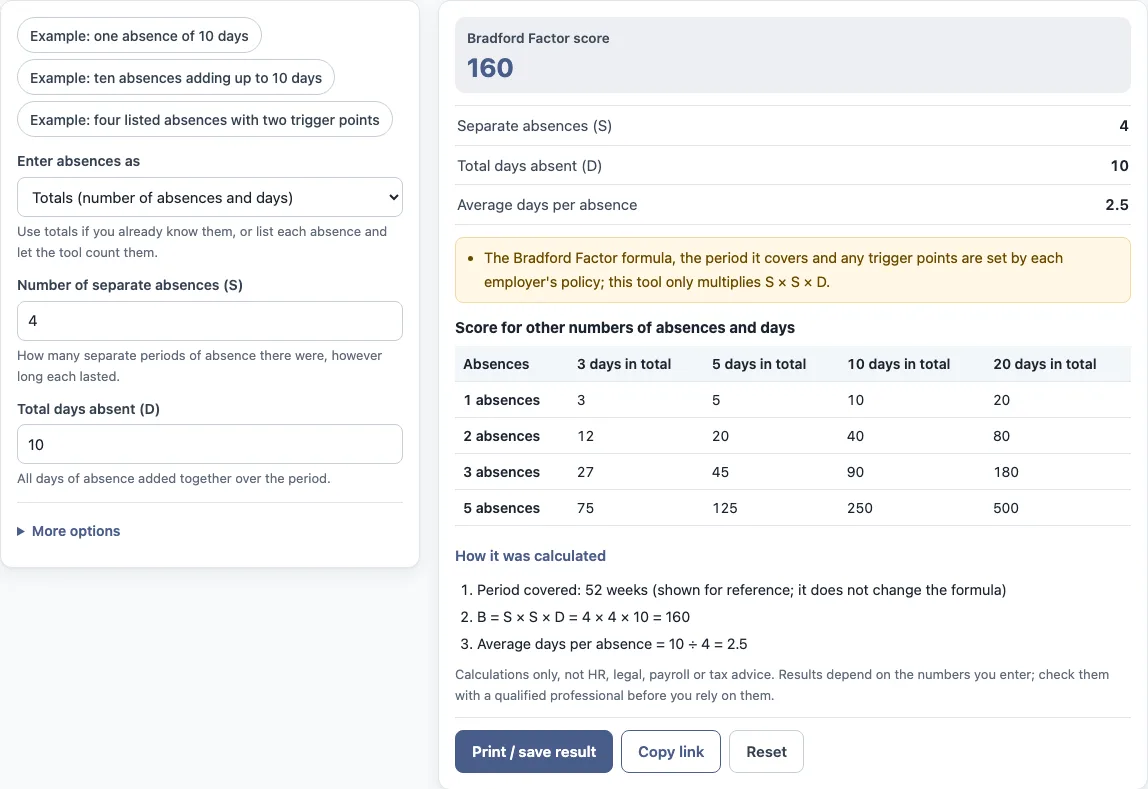
- Under “Enter absences as”, choose “Totals (number of absences and days)” if you already know both figures, or “A list of absences” if you have each absence.
- For totals, type the “Number of separate absences (S)” and the “Total days absent (D)”.
- For a list, enter one absence per line with its days. Select “+ Add an absence” to add a line, or × to remove one.
- Open “More options” to set the “Period covered (weeks)” label, or type up to three values into “Trigger point 1”, “Trigger point 2” and “Trigger point 3”. Leave a trigger point blank to skip it.
- Read the results: “Bradford Factor score”, “Separate absences (S)”, “Total days absent (D)”, “Average days per absence”, and any “Compared with trigger point” lines.
- Open “How it was calculated” under the result to see each step with your own numbers.
The three presets, “Example: one absence of 10 days”, “Example: ten absences adding up to 10 days” and “Example: four listed absences with two trigger points”, fill the form with sample entries. “Reset” restores the example values. The values in the form are examples, not company data, so replace them with your own. “Print / save result” prints a one-page sheet with the inputs, results, calculation steps and date; choose save as PDF in the print dialog. “Copy link” copies a link that reopens the same inputs.
What is the Bradford factor meaning, and what is the Bradford score meaning or the Bradford factor score meaning?
The Bradford factor, Bradford score, Bradford index or Bradford points value is one number calculated from absence records. The formula is B = S × S × D, where S is the number of separate absence spells and D is the total number of days absent, usually over a rolling 52 weeks. The tool carries out this multiplication for you.
The tool’s default values give a worked example. With S = 4 and D = 10, the calculation is 4 × 4 × 10 = 160. The “Average days per absence” output is 10 ÷ 4 = 2.5. These defaults are sample figures only.
Employers can define the Bradford factor system differently. The formula, the period and the trigger points are set by each employer’s policy, and the tool’s notes say so directly under the result.
Why do several short absences score higher than one long one?
Because S is squared, the number of separate spells has a larger effect on the score than the number of days does. D is only multiplied once, while S is multiplied by itself. Adding one more spell increases the S × S part by more than adding one more day increases D.
Take the worked example again. The score of 160 comes from 4 spells and 10 days. A single absence of 10 days, which is one spell, would give a much smaller S × S part. The tool’s preset “Example: ten absences adding up to 10 days” shows how the same total days can be split across more spells, and the table “Score for other numbers of absences and days” shows scores for other combinations.
The period label does not change this. The “Period covered (weeks)” field is shown for reference only, and the formula stays the same whatever value it holds.
Can the Bradford score be used for sickness absence?
The Bradford score for sickness is the same calculation: S × S × D over the absences an employer chooses to count, such as sickness absence in a rolling 52 weeks. Which absences count, and over what period, is set by the employer’s policy. The tool multiplies the numbers you enter and does not know which absences belong in the count.
Sources: Wikipedia: Bradford Factor.
Frequently asked questions
What are Bradford factor trigger points?
Trigger points are scores that an employer sets in its own policy to compare against the result. You can type up to three into the tool, and it states whether the score is below or at/above each one. Leave a field blank to skip it.
Does the tool say what action to take when a trigger point is reached?
No. The tool only states whether the score is below or at/above each trigger point. It does not say what action follows, because that is defined by the employer’s policy.
Can I enter a list of absences instead of totals?
Yes. Choose “A list of absences” under “Enter absences as”, then enter one absence per line with its days. The tool counts the separate absences and adds up the days to find S and D.
Does changing the period covered change the Bradford factor score?
No. The “Period covered (weeks)” value appears in the calculation only for reference. The score is always S × S × D, so changing the period does not alter the result.
Is the information I type sent anywhere?
The tool runs in your browser, and nothing you type is uploaded. It is free and needs no account or sign-up.
Can I use the results in HR reports or policy documents?
Yes. Results may be used in commercial work, such as HR reports, policies, board packs and client documents, without attribution. The tool gives no HR, legal, payroll or tax advice, so check the result against your own policy.
Related tools
- FTE calculator: use it to convert working hours into full-time equivalent figures.
- FTE hours calculator: use it when you need the hours behind a full-time equivalent.
- FTE salary calculator: use it to work out a salary for a given full-time equivalent.
- Absence rate calculator: use it to measure absence as a rate over a set period.
- Span of control calculator: use it to count how many people report to each manager.
- Turnover rate calculator: use it to measure how many leavers there are relative to headcount.
- Cost per hire calculator: use it to work out the cost of filling a vacancy.