Attrition Rate Calculator
Enter the leavers, the headcount and the positions refilled to get gross and net attrition.
Recent
Your last 10 settings, saved only in this browser. Nothing is uploaded.
How to use the attrition rate calculator
- Enter “Headcount at the start of the period”: the number of people employed on the first day of the period.
- Enter “Headcount at the end of the period”: the number of people employed on the last day of the period.
- Enter “People who left in the period”: count every person who left the organisation during the period, for any reason.
- Enter “Leavers whose positions were refilled”: how many of the leavers’ positions were filled again. Enter 0 if none were refilled or if you only want the gross rate.
- Enter “Length of the period (months)”: use 12 for a year, 3 for a quarter or 1 for a month.
- Read the results: “Gross attrition rate (all leavers)”, “Net attrition rate (leavers not replaced)”, “Average headcount”, “Gross rate annualised (same pace for 12 months)” and “Positions not refilled (leavers minus refilled)”. Under the result, “How it was calculated” lists each step with your numbers.
To try the tool first, select one of the presets: “Example: 18 leavers, 6 positions refilled, one year”, “Example: 4 leavers in a quarter, none refilled” or “Example: 40 leavers, all refilled”. “Reset” restores the example values. “Copy link” copies a link that reopens the same inputs, and the page address keeps your inputs after any change. “Print / save result” prints a one-page sheet with the inputs, results, calculation steps and date. To keep a PDF, choose save as PDF from the print dialog.
How do I calculate attrition rate, and how to compute attrition rate?
The gross attrition rate is the number of leavers divided by the average headcount, multiplied by 100. Average headcount is the start headcount plus the end headcount, divided by 2. This is the formula the tool uses; organisations, policies or contracts may define attrition differently.
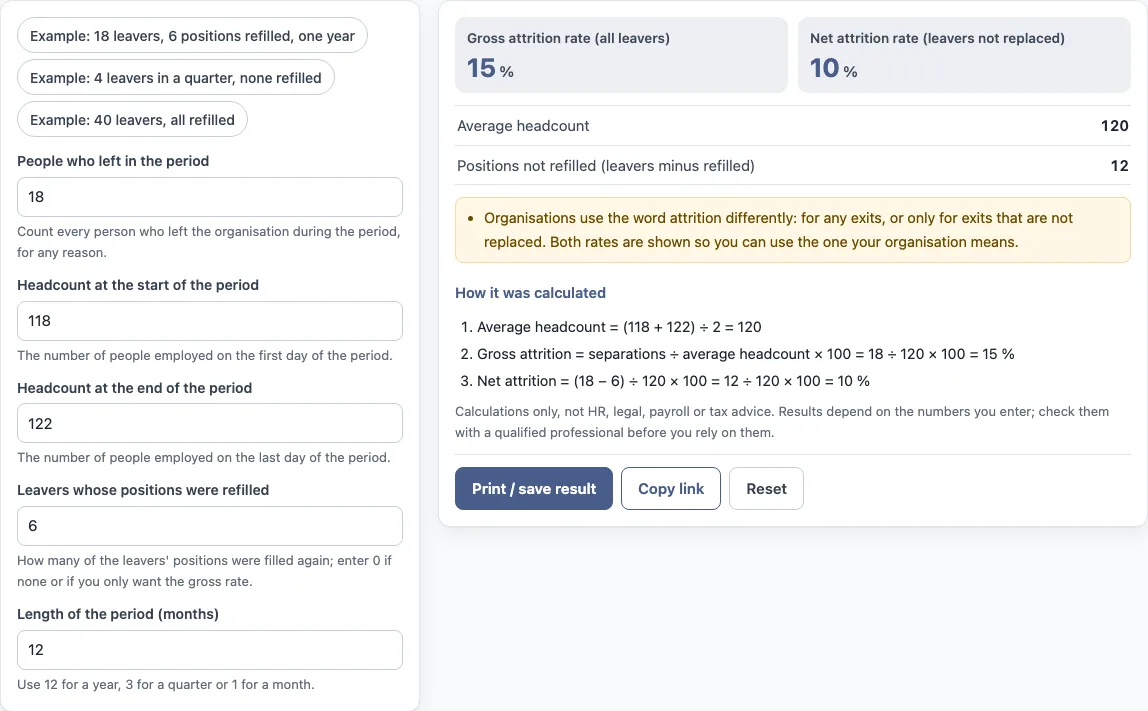
The tool’s default values show the steps: Average headcount = (118 + 122) ÷ 2 = 120. Gross attrition = 18 ÷ 120 × 100 = 15 %. Net attrition = (18 − 6) ÷ 120 × 100 = 10 %.
How do you calculate attrition rate for a period other than a year?
Enter the number of months in “Length of the period (months)”. The gross and net rates describe the leavers and headcount for the period you enter. For a period shorter than 12 months, the tool also shows “Gross rate annualised (same pace for 12 months)”, which is the gross rate at the same pace over a full year. For a monthly rate, enter 1.
What is the difference between gross and net attrition?
Gross attrition counts every leaver, whatever the reason. Net attrition subtracts the leavers whose positions were refilled, so it counts only the positions not replaced. The net rate is never below 0. If you enter 0 for refilled positions, the net and gross rates are the same. In the default example, gross attrition is 15 % and net attrition is 10 %, because 6 of the 18 leavers were refilled.
Is attrition the same as turnover?
Not always. The two words are used differently by different organisations, and this tool does not define turnover. On this page, attrition means the gross and net calculations described above. Check the definition your organisation or report uses for each term. The turnover calculators linked below cover that calculation separately.
What does the annualised figure assume?
The annualised gross rate takes the rate for your period and scales it to 12 months: rate × 12 ÷ months in the period. It assumes the same pace of leavers for the whole year. A quarter with an unusual number of exits, such as a restructuring, will give an annualised figure that does not describe a normal year. The tool shows the annualised figure only for periods shorter than 12 months and states what it assumes under the result.
Frequently asked questions
Does the calculator save the numbers I enter?
Nothing you type is uploaded, because the tool runs in your browser. The page address keeps your inputs, and “Copy link” gives you a link that reopens the same inputs.
Can I use the results in reports or policies?
Yes. Results may be used in commercial work such as HR reports, policies, board packs and client documents, without attribution. The tool is arithmetic only and gives no HR, legal, payroll or tax advice.
Does the tool say whether my attrition rate is good or bad?
No. It shows the arithmetic only and does not say what a result means for any person or for the organisation.
Do the numbers on the page come from real company data?
No. The values already in the form are an example, not real company data. Replace every one with your own numbers before you use a result.
What does “Positions not refilled” show?
It shows the leavers minus the leavers whose positions were refilled. In the default example, 18 leavers minus 6 refilled gives 12.
Which headcount does the attrition rate use?
The average headcount for the period: the start headcount plus the end headcount, divided by two. Enter both headcounts and the tool works out the average and shows it as “Average headcount”.
Related tools
- Turnover rate calculator: use it when you want a turnover rate rather than an attrition rate.
- Annual turnover rate calculator: use it when you want the turnover rate over a full year.
- Employee retention rate calculator: use it to work out the share of staff who stayed over a period.
- Cost of turnover calculator: use it to total the costs linked to staff leaving.
- Cost per hire calculator: use it to work out what filling one position costs.
- Absence rate calculator: use it to measure the rate of staff absence over a period.
- FTE calculator: use it to convert working hours into full-time equivalent figures.